How to Use Hashtags on Instagram in 2026 (Now You Only Get Five)
Instagram now allows five hashtags per post. What they still do, where to put them, and how to pick the right five, with live post counts from our database.

Short answer: Here’s how to use hashtags on Instagram in 2026: use up to five per post, in the caption, each describing the post the way someone would search for it. Pick one broad topic tag, three smaller ones that fit this exact post, and one of your own. Check none is restricted. They help search, not reach.
Until December 2025 you could add 30 hashtags to a post, and plenty of people did. Instagram has since cut that to five. Its Help Center now puts it in one line: “You can use up to 5 tags on a post.”
A lot of the advice still ranking on Google was written for the 30-tag era. You’ll find guides saying 30 is the limit, that you should hide extra tags in the first comment, or that hashtags are how you reach new people. None of that holds up now.
This is the guide I’d want to read: what hashtags actually do on Instagram today, the rules as Instagram documents them, how to choose five using real post counts from our database, where to put them, and how to tell whether they’re doing anything. Where Instagram hasn’t documented something, I’ll say so rather than guess.
How hashtags work on Instagram now
A hashtag is a label. Add #sourdoughscoring to a post from a public account and Instagram files it on the #sourdoughscoring hashtag page, next to every other public post carrying that tag. In the words of Instagram’s Help Center page on hashtags: “If you have a public account and add hashtags to a post, the post will be visible on the corresponding hashtag page.”
That label does three jobs:
- It tells Instagram what the post is about. Instagram’s head, Adam Mosseri, said in May 2025 that hashtags “don’t improve visibility on Instagram” but are “a great way to let people know what a post is about and connect posts,” as reported by Social Media Today.
- It puts the post on a page people can reach by tapping the tag or searching for it.
- It gives the post a position on that page. Instagram lists three factors that decide the order of hashtag search results: “When the post was shared.” “How others engage with the post.” “If content meets our Recommendation Guidelines.”
Most guides skip that last point, and it matters. Being on a hashtag page isn’t the same as being seen there. On a tag with a billion posts, a new post from a small account starts at the bottom of a very large pile.
What hashtags don’t do anymore
They don’t put your post in front of people who follow the tag, because nobody can follow a tag now. Instagram told Social Media Today in November 2024: “We’re removing the ability to follow a hashtag on Instagram.” The same statement said you’ll “still be able to use hashtags in your posts and search with a hashtag to discover related posts,” and that Instagram would keep showing people posts “via recommendations in Feed, Explore, and Reels.”
And they don’t reliably add reach. Mosseri said so in 2025, and Instagram’s explanation for the five-tag cap pointed the same way: “We find that using fewer (up to 5) more targeted hashtags, rather than many generic ones…”
Still worth two minutes per post? I think so, for the narrow job they do: helping people find a post through search and tag pages, and helping Instagram file it correctly. The independent data on hashtags and reach is mixed and correlational; I go through it in whether hashtags still work on Instagram.
The rules in 2026: five hashtags, and what counts toward them
The five-hashtag limit
Instagram announced the change on December 18, 2025. As quoted by Social Media Today: “Instagram will gradually update the number of hashtags that you can include in a caption for a reel or post to five.” The rollout was gradual, so some accounts got it later than others. Before that, the limit was 30.
It didn’t come out of nowhere. In February 2024 some users saw a pop-up that stopped them at five hashtags, and Instagram called it a glitch. In late 2025 some accounts were capped at three in a test. Five is where it landed, and I haven’t found any sign of a further change as of October 2026.
The wording covers “a reel or post,” so single photos, carousels and Reels all get the same five. For the full history, and the case for using fewer than five, see how many hashtags to use on Instagram.
What happens if you add a sixth
The Help Center describes one case: “If you include more than 5 tags on a single photo/video, your comment won’t post.” It doesn’t say what the caption box does. Users have reported that the app stops accepting more tags or shows a message, but I couldn’t confirm the exact wording Instagram uses now. Instagram documents a blocked comment, not a penalty on the post.
Do hashtags in the comments count toward the five?
Probably, but Instagram hasn’t said so in as many words. The Help Center says you can add hashtags “in the caption or comments of your post” and that you can use “up to 5 tags on a post.” Read together, that’s one budget of five per post, and the comment rule above fits that reading. Social Media Today pointed out that the announcement didn’t define it either. Treat it as five in total and you won’t hit a wall.
Either way, the old trick of a few tags in the caption and 25 more in the first comment is finished.
Characters, spaces and private accounts
- Instagram’s rule: “Numbers are allowed in hashtags. However, spaces and special characters, like $ or %, won’t work.” A space ends the tag, so typing #sourdough bread tags only #sourdough.
- Underscores work. Our database has #sourdough_mania with 52,062 posts.
- Accented letters make a different hashtag. #homewörkout (21,633 posts) is not #homeworkout (12,424,478).
- Private accounts don’t show up on hashtag pages. The Help Center: “When people with private profiles tag posts, they won’t appear publicly on hashtag pages.” If you want hashtags to help strangers find you, the account has to be public.
How to choose your five hashtags
Most hashtags are smaller than you think
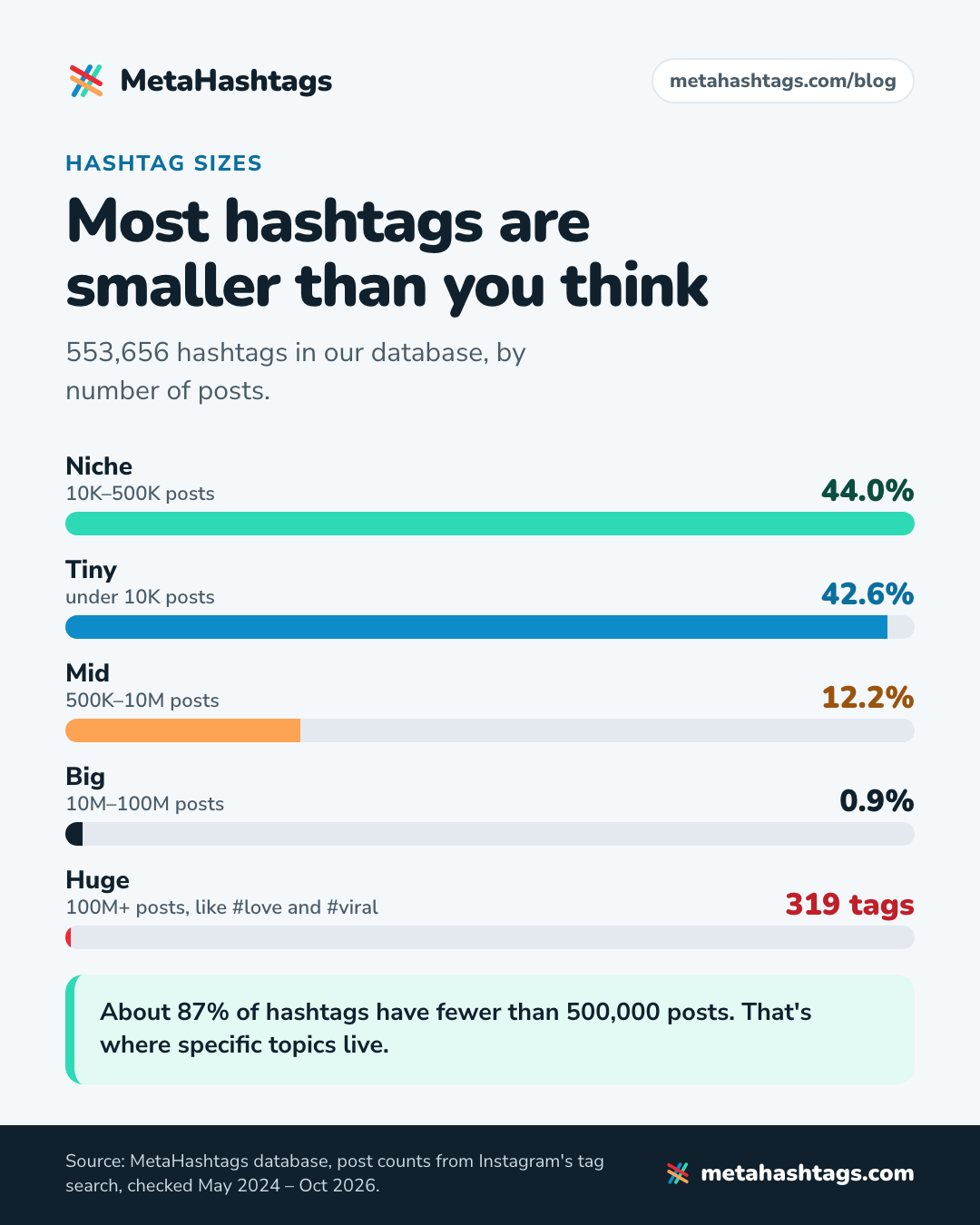
Our database at MetaHashtags holds 553,656 hashtags, each with the post count Instagram’s own tag search returns. Counts were last checked between May 2024 and October 2026, and the tags people search most often get re-checked most often. Here’s how they split by size, using the same tiers our generator shows:
| Tier | Posts on the tag | Hashtags | Share |
|---|---|---|---|
| Huge | 100M+ | 319 | 0.06% |
| Big | 10M–100M | 4,731 | 0.9% |
| Mid | 500K–10M | 67,548 | 12.2% |
| Niche | 10K–500K | 243,732 | 44.0% |
| Tiny | Under 10K | 236,131 | 42.6% |
| Empty | 0 | 1,195 | 0.2% |
The hashtags everybody knows, like #love, #instagood and #viral, belong to a club of 319 out of more than half a million. About 87% of the hashtags in our database (479,863 of them) have fewer than 500,000 posts. That’s where specific topics live: #sourdoughscoring, #weddingphotographerlondon (55,428 posts), #homeworkoutsformoms (20,702).
A post count is an all-time total: it tells you size, not how busy a tag is this week. More on reading it in how to check hashtag popularity.
Why the giant hashtags don’t help
I compared two snapshots of #viral from our database. On April 27, 2025 it had 988,579,798 posts. On October 19, 2026 it had 1,579,428,371. That’s about 590.8 million new posts in 540 days, roughly 1.09 million a day, or about 13 every second.
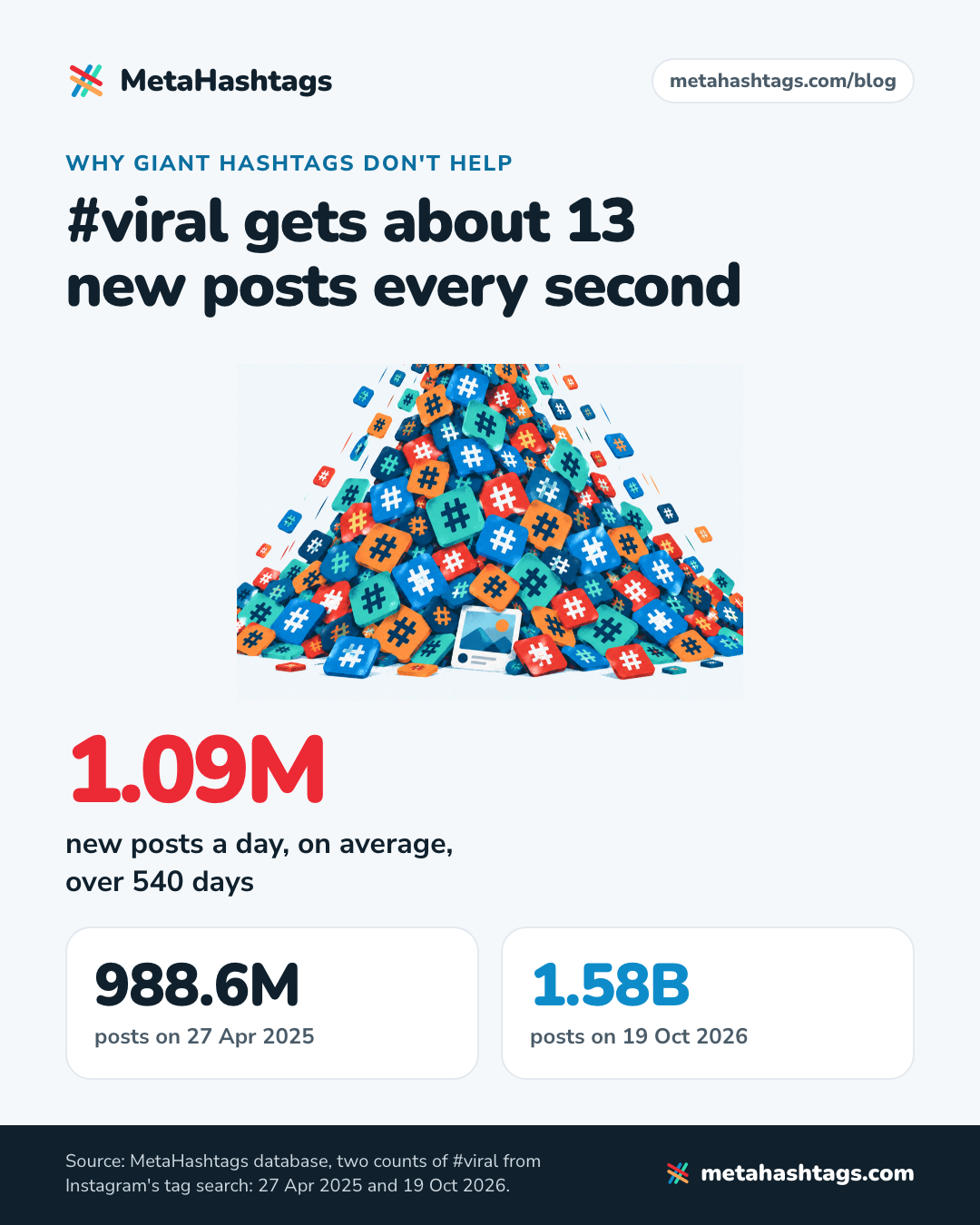
Now remember how hashtag pages are sorted: by when a post was shared, how people engage with it, and whether it meets the Recommendation Guidelines. A fresh post from a small account on #viral is up against about 760 new posts a minute, on top of a back catalog of more than 1.5 billion. I wouldn’t expect anyone to scroll far enough to find it.
The other engagement-bait tags look the same. #explorepage grew from 595,371,297 posts (May 4, 2025) to 792,571,500, about 370,000 a day. #reels added roughly 694,000 a day over a similar stretch. In percentage terms these grew fastest of the big tags I compared, which tells you people are still stuffing them in after the cap. That’s one of five slots spent on a lottery ticket.
A simple formula for five
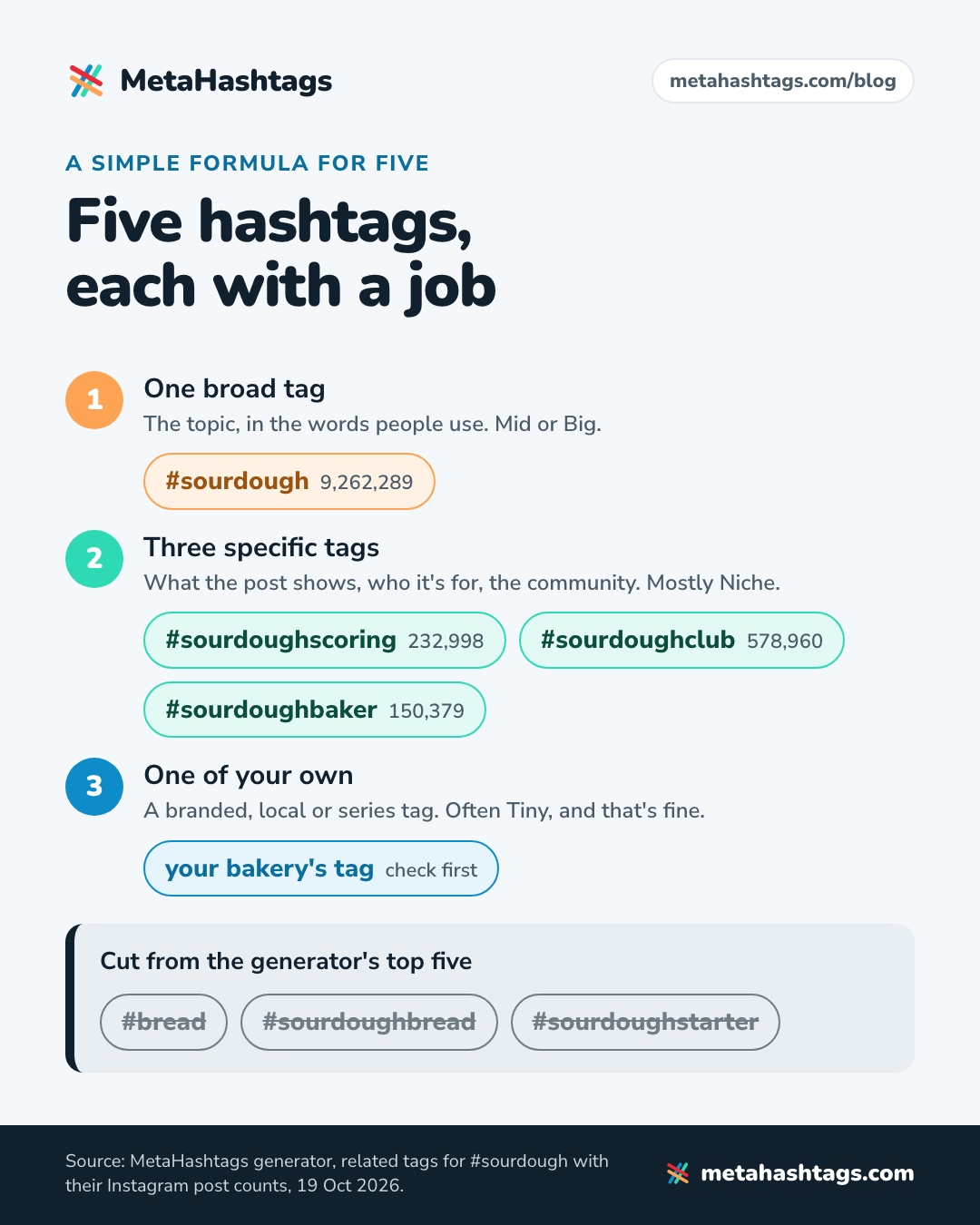
Give each tag a job. This is the mix I’d start from:
- One broad tag (Mid or Big). The topic, in the words people use: #sourdough rather than #food or #bread.
- Three specific tags, mostly Niche. What this post shows, who it’s for, or the community around it.
- One of your own. A branded, local or series tag. It’ll often be Tiny, and that’s fine: its job is to group your posts.
Treat it as a starting point. If a post only has three honest tags, use three: a relevant tag with 40,000 posts beats an irrelevant one with 400 million. Huge tags (100M+) almost never earn a place, and a set built only from tags with a few hundred posts may have nobody browsing it.
Worked example: a sourdough post
Say you run a small sourdough bakery and you’re posting a close-up of a loaf with a wheat-ear scoring pattern. I ran #sourdough through our generator on October 19, 2026. Its top five suggestions were #bread, #sourdough, #sourdoughbread, #sourdoughstarter and #sourdoughscoring, which is a sensible general-purpose set. For this particular post, I’d change three of them:
| Hashtag | Posts | Use it? |
|---|---|---|
| #bread | 21,125,413 | No: covers every kind of bread |
| #sourdough | 9,262,289 | Yes: the broad tag |
| #sourdoughbread | 3,745,946 | No: says the same as #sourdough |
| #sourdoughstarter | 1,281,078 | No: the post isn’t about starter |
| #sourdoughclub | 578,960 | Yes: the community |
| #sourdoughpizza | 304,183 | No: wrong post |
| #sourdoughscoring | 232,998 | Yes: exactly what the photo shows |
| #sourdoughbaker | 150,379 | Yes: who you are |
| Your bakery’s tag | Check first | Yes: your own slot |
Final five: #sourdough, #sourdoughscoring, #sourdoughclub, #sourdoughbaker and your own tag. A local tag works in that last slot too, if your town has an active one (check its count first).
Next week’s post about crackers made from starter discard gets a different set. #sourdoughdiscard (140,644 posts) and #sourdoughdiscardrecipe (28,719) would replace #sourdoughscoring and #sourdoughclub.
Where to put hashtags on Instagram: caption or first comment?
In the caption. Instagram allows both, but only the caption comes with Instagram’s own recommendation. Its Creators blog says: “To have your post found in Search, put these keywords and hashtags in the caption, not the comments.” That page dates from August 2022 and may have been edited since, but I haven’t found anything newer from Instagram that says otherwise.
Hashtags in the first comment were a 30-tag habit, a way to keep a wall of tags out of the caption. With five, there’s no wall to hide.
Instagram hasn’t said that position within the caption matters, so put them wherever they read best. Most people put them at the end. You can also work one into a sentence (“Trying a new #sourdoughscoring pattern this week”) if it sounds natural.
Your caption words matter as much as the tags
The same Creators blog page says: “Search results are matched by text, so make sure you’re including relevant keywords.” With only five hashtags, the plain words in your caption carry more of the load. A caption that says “wheat-ear scoring on a high-hydration sourdough loaf” gives search far more to match than five tags on their own.
There’s a second audience for those words. Instagram’s Help Center says search engines like Google and Bing may index public posts and reels from accounts that are public, professional and run by someone over 18. Captions written for people searching work in both places. I cover names, bios and captions in my Instagram SEO guide.
Alt text is cheap too. Instagram hasn’t said it feeds search, so write it for the person who can’t see the photo.
Hashtags on Reels, Stories and in your bio
Reels
Same rules: five tags, in the caption. The announcement covered “a caption for a reel or post.” What’s different about Reels is how people find them. Reels mostly travel through recommendations, in the Reels tab, Explore and Feed, so the hashtag’s job is to label the reel for search and for Instagram’s systems.
That’s why the usual #reels #viral #explorepage #trendingreels set is a waste. Those four tags hold more than 4.4 billion posts between them in our database. Format tags do better work when they fit: #nailarttutorial (529,034 posts) says far more about a reel than #reels (1,431,016,941). There’s a full walkthrough in how to use hashtags on Instagram Reels, and a Reels version of our generator if you want suggestions with counts.
Stories
Stories have a hashtag sticker. Neither the December 2025 announcement nor Instagram’s hashtag Help Center page mentions Stories, so the five-tag cap isn’t documented for them. You’ll see “up to 10 hashtags per Story” on a lot of blogs; I couldn’t find that number anywhere from Instagram. My advice: one or two relevant tags, usually as the sticker, placed so they don’t cover the thing you’re showing.
Your bio
Hashtags in a bio are widely reported to be clickable, though Instagram’s Help Center doesn’t document it. Think about what that click does: it sends a visitor off your profile to a page full of other people’s posts. The only hashtag I’d put in a bio is your own branded one, and only once people actually use it.
Branded hashtags: how to create one that works
A branded hashtag is one you make up for your business, a series or a campaign: your bakery’s name, say, or a monthly bake-along. You don’t register it anywhere. As far as I can find, there’s no way to reserve or own a hashtag on Instagram (nothing in the Help Center describes one), and anyone can put any tag on their own posts. So the work is picking one nobody else is using and then getting people to use it.
- Keep it short and easy to spell, and read it in all lowercase (the way most people will type it) to make sure it doesn’t spell something else by accident.
- Search it on Instagram before you commit. Ideally it has no posts yet, or only yours. If someone is already using it for something unrelated, pick another.
- Check it isn’t restricted. Our banned hashtag checker takes a second.
- Use it on every relevant post, so the tag page becomes an archive of your work.
- Put it where customers will see it (your bio, packaging, a card at the counter) and ask them to use it when they post.
Two things to know before you lean on it. Nobody can follow a hashtag anymore, so “follow #ourtag for updates” doesn’t work as a call to action: the tag page is a gallery, not a subscription. And posts from private accounts won’t appear on it, so some customers who use your tag will never show up there. A small count doesn’t mean nobody’s posting.
For campaigns, a separate tag per campaign (brand name plus the campaign) keeps entries in one place and gives you a clean count to watch over time.
Mistakes that waste your five slots
Using a hashtag Instagram has restricted
Some hashtags don’t work at all. Instagram’s Help Center explains why you can’t search for certain hashtags: “Hashtags on Instagram may not be searchable if the text or the content associated with the hashtag consistently do not follow our Terms of Use or Community Standards.” It adds that it reviews these tags “periodically and may make a hashtag searchable again” when things change.
Instagram doesn’t publish a list, and the restricted tags aren’t all obvious. Our checker uses a curated list of 1,861 hashtags Instagram has restricted, and it includes everyday words: #desk, #elevator, #pushups, #always, #adulting, #beautyblogger, #boho, #petite. A fitness coach could add #pushups without a second thought. Because Instagram restricts and un-restricts tags without announcing it, a list you checked last year may not hold today.
If your posts have stopped reaching people who don’t follow you, a restricted tag is one possible cause among several. I go through how to check properly, including Account Status, in Instagram shadowban: how to check, fix and avoid it.
Spending a slot on a giant generic tag
#love is so big that Instagram’s counter has run out of room. Our database gets exactly 2,147,483,647 posts back for it, the largest number a signed 32-bit integer can hold, so its real count can’t be seen from outside. #instagood is next at 2,025,328,379. Tags this size say nothing about your post, and a post from an ordinary account has little chance of being seen on their pages.
Some old favorites aren’t even growing. #photooftheday shrank from 1,093,195,469 posts (May 5, 2025) to 1,082,354,419 (October 19, 2026), so more posts left the tag than joined it. If your list dates from the 30-tag days, it’s worth rebuilding.
Chasing “trending” hashtags that aren’t trending
#trending has 1,218,596,854 posts and #trendingreels has 658,065,402. Both are evergreen giants that people add in the hope the word itself does something. Instagram doesn’t publish an official list of trending hashtags; the trending feature it documents is for audio, and its Help Center says that’s US-only. To spot a tag that’s genuinely rising, use the repeatable method in how to find trending hashtags on Instagram.
Copy-pasting lookalike hashtags
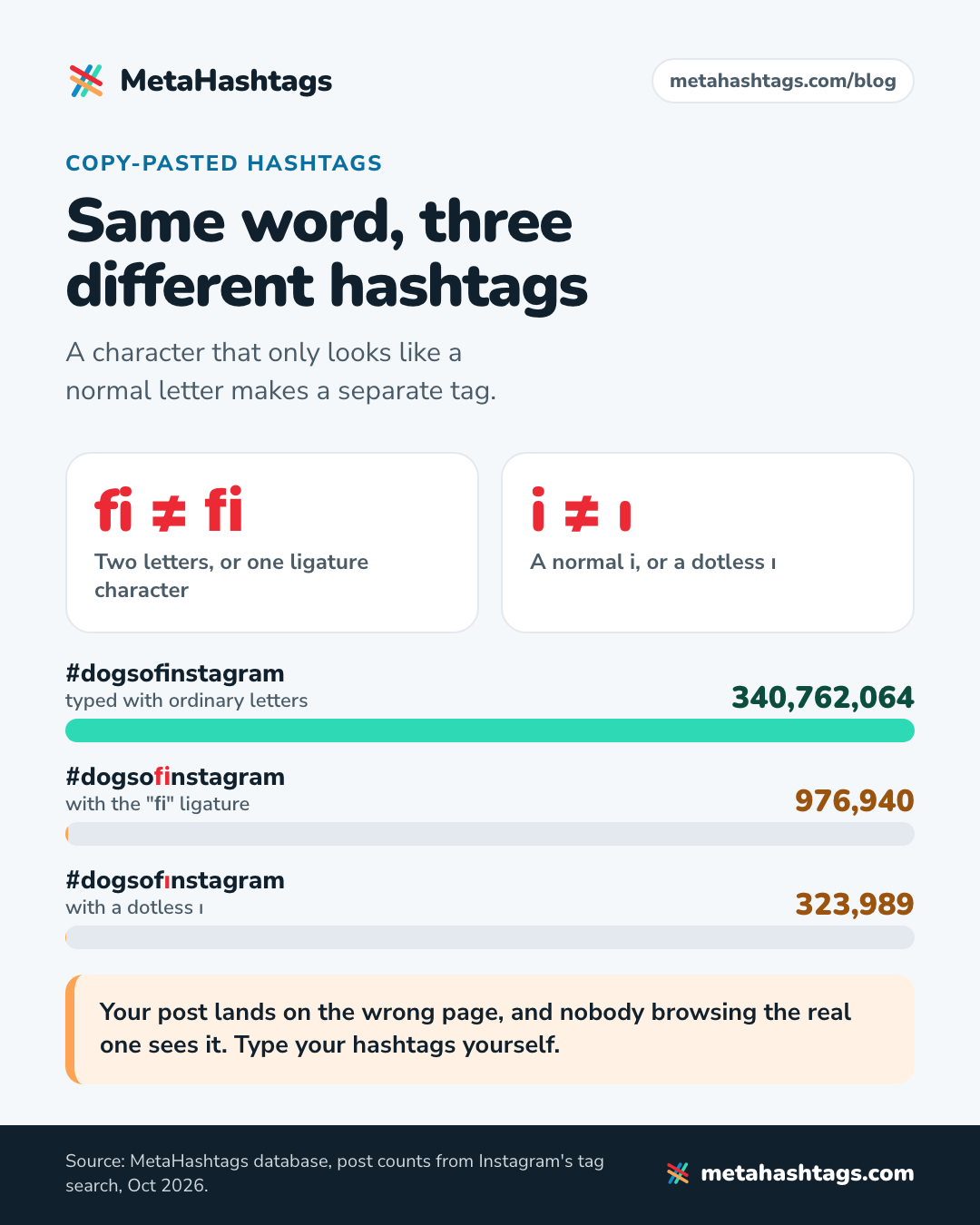
This one is invisible. Hashtags copied from “fancy font” generators or old lists sometimes contain characters that look identical to normal letters but aren’t. Instagram treats them as completely different tags.
From our database: #dogsofinstagram has 340,762,064 posts. Written with the “fi” ligature (a single character that looks like an f and an i), #dogsofinstagram is a separate hashtag with 976,940 posts. With a dotless ı, #dogsofınstagram is another, with 323,989. Your post lands on the wrong page, and nobody browsing the real one sees it.
The fix is boring: type your hashtags yourself instead of pasting them from a styled source.
Using the same five on every post
A fixed set means most of your posts are mislabeled. The sourdough discard post above has no business carrying #sourdoughscoring. You’ll read that repeating the same set gets you penalized; I couldn’t find Instagram saying that anywhere. The real cost is relevance. Keep a list of 15 to 20 tags for each topic you post about and pick five per post.
How to tell if your hashtags are working
This is harder than it should be. Instagram doesn’t document any way to see how many views came from your hashtags. Older guides mention an “impressions from hashtags” figure, but Views has since replaced Impressions as Instagram’s main metric, and I couldn’t find a hashtag breakdown anywhere in its current documentation.
What you can see, according to Instagram’s guide to insights: views and interactions for each post, profile activity after someone engages with it, and accounts engaged split into followers and non-followers. The non-follower numbers are the closest thing to a hashtag signal, because people who already follow you didn’t need a tag to find the post.
A simple test you can run:
- Pick two hashtag sets for the same kind of post. For example, set A uses a mid-size community tag and set B swaps it for a niche one.
- Alternate them across eight to ten similar posts over a month.
- Seven days after each post, write down the non-follower share of accounts engaged and the profile activity.
- Compare the averages. If one set wins clearly, keep it and test a new challenger against it.
Be honest about the result. Ten posts is a small sample, and the photo, the caption and the timing will probably move the numbers more than the tags do. A small difference is noise.
A rough sanity check: search a small tag you used and look for your post on its page. If your posts never show up on small tags while your account is public, look at Account Status before blaming the hashtags. The longer version, including how to track a tag’s growth over time, is in how to measure hashtag performance on Instagram.
How to use hashtags on Instagram, step by step
Here’s the whole routine. Once you have a list for each topic, it takes a couple of minutes per post.
- Write the caption first. Say plainly what the post is, using the words someone would type into search.
- Collect 10 to 20 candidates: Instagram’s search suggestions, the tags on top posts in your niche, what your peers use, and a generator. My full method is in how to find hashtags for Instagram.
- Check each tag’s post count (our generator shows live counts) and sort them by size.
- Cut anything restricted, misspelled or pasted from a fancy-font source.
- Pick five by role: one broad, three specific, one of your own. Fewer is fine if fewer fit.
- Put them in the caption, not the comments, and post.
- Judge results over weeks, not hours, and rotate sets to see what works for you.
Instagram hashtag questions people ask
Are Instagram hashtags case-sensitive?
Instagram’s Help Center doesn’t say. Third-party guides say capitals don’t create a separate tag, so #SourdoughSunday and #sourdoughsunday would lead to the same page, but I couldn’t confirm that from Instagram. Use capitals where they make a multi-word tag easier to read.
Do I have to use all five?
No. The limit is “up to 5.” Studies on how many tags perform best disagree with each other and only show correlation, so I wouldn’t let them decide for you. Use as many as genuinely describe the post; for most posts that’s four or five.
Can hashtags get my account shadowbanned?
What Instagram documents is narrower than the rumor. Some hashtags aren’t searchable, and content can be ineligible for recommendation to people who don’t follow you, which professional accounts can check in Account Status. A restricted tag simply won’t work as a way to be found. Check your tags, then check Account Status.
Keep reading
-
 Instagram Hashtags
Do Hashtags Still Work on Instagram in 2026? Yes, but Not for Reach
Hashtags still work on Instagram as labels, not as a reach hack. What Instagram has said, why the studies disagree, and a four-week test… -
 Instagram Hashtags
How Many Hashtags on Instagram in 2026? Five, and How to Pick Them
Instagram now allows five hashtags per post, not 30. What changed, what happens if you add a sixth, what the studies say about using… -
 Instagram Hashtags
How to Check Hashtag Popularity (and What the Post Count Hides)
Where to find a hashtag's post count, what that number leaves out, and how to judge a tag's size, activity and risk, with data…