How to Find Hashtags for Instagram (and Choose Your 5) in 2026
A method, not a list: where to find hashtag ideas inside Instagram, five checks for every candidate, and how to land on five, with real post counts.

Short answer: To find hashtags for Instagram, search a few words that describe your post, open the tags Instagram suggests, and note which tags keep showing up on top posts and on accounts like yours. Then keep only the tags that fit this post, check each one’s size and safety, and put your best five in the caption.
Instagram changed the job in December 2025. You now get five hashtags per post, and that changes how to find hashtags for Instagram: you’re no longer collecting thirty that look popular, you’re looking for the five that describe this particular post the way a real person would search for it.
Most guides ranking for this were written for the old rules. Some still tell you to follow hashtags (you can’t) or paste 30 into the first comment (that comment won’t post). Below is the method I’d use today, with real post counts from the MetaHashtags database, checked in October 2026.
What changed: five hashtags, and a different job for them
Instagram’s Help Center is blunt about the limit: “You can use up to 5 tags on a post. If you include more than 5 tags on a single photo/video, your comment won’t post.” (Use hashtags on Instagram). The cap was announced on December 18, 2025 and rolled out gradually, with Instagram arguing for “fewer (up to 5) more targeted hashtags, rather than many generic ones” (Social Media Today).
Two other things matter for how you find hashtags now.
First, hashtags aren’t a reach lever. Adam Mosseri, who runs Instagram, said in May 2025 that hashtags “don’t improve visibility on Instagram” but are “a great way to let people know what a post is about and connect posts” (as reported by Social Media Today). So a hashtag’s job is labeling and search, and a big tag that doesn’t describe the post does nothing.
Second, you can’t follow hashtags any more. In November 2024 Instagram told Social Media Today: “We’re removing the ability to follow a hashtag on Instagram.” The old trick of following a dozen niche tags to see what turned up in your feed is gone. The same statement says: “You will still be able to use hashtags in your posts and search with a hashtag to discover related posts.” (Social Media Today). Search is now your main research tool, and it’s also where your post gets found.
The full rulebook (placement, branded tags, Stories) is in our guide on how to use hashtags on Instagram. This article sticks to finding and choosing them.
How to find hashtags for Instagram, step by step
Steps 1 to 5 are free and happen inside Instagram. Step 6 is an optional shortcut.
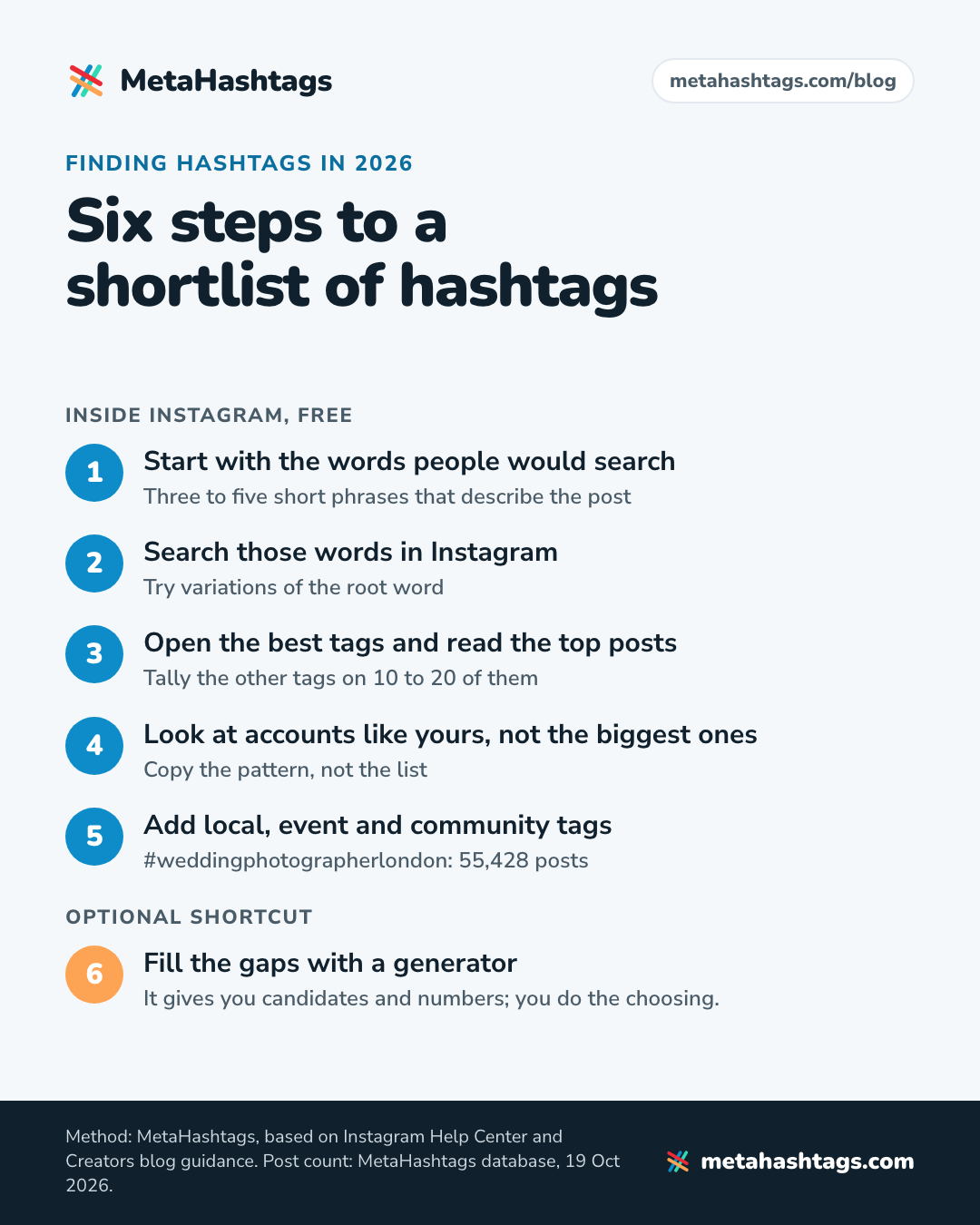
Step 1: Start with the words people would search
Before you open the app, write down three to five short phrases that describe the post: what it shows and who it’s for, plus the place if that matters. Say you run a small sourdough bakery and you’re posting a reel of yourself scoring a loaf. Your phrases might be “sourdough scoring”, “sourdough bread”, “sourdough baker” and the name of your town.
Instagram’s Creators blog says “Search results are matched by text, so make sure you’re including relevant keywords” (What Creators Need To Know About Instagram Recommendations). So these phrases do two jobs: keywords for your caption and seeds for your hashtag research. More on the caption side in our piece on how Instagram search finds your posts.
Step 2: Search those words in Instagram
Type each phrase into Instagram search and look at the hashtags it suggests. Then try variations of the root word, because each one pulls up a different set: “sourdough”, “sourdough bread” and “sourdough baking” won’t give you the same suggestions.
A note on post counts. Instagram keeps one for every hashtag (it’s the number our generator reads from Instagram’s own tag search), but where the app displays it has moved around over the years, and the Help Center doesn’t describe the current layout. So I won’t promise you a particular screen. If you see counts next to the suggestions, write them down. If not, here’s how to check a hashtag’s post count another way.
Step 3: Open the best tags and read the top posts
Tap into the two or three tags that fit your post best. According to Instagram, the order of posts in hashtag results depends on “When the post was shared”, “How others engage with the post” and “If content meets our Recommendation Guidelines” (How posts appear on hashtag search results). That makes a hashtag page a mix of recent posts and ones people respond to, which is good research material.
Open 10 to 20 of them, read the captions and tally the other hashtags they use. A tag on six of fifteen top posts is a real candidate; a tag that shows up once is noise. Check how old the posts are while you’re there. (Instagram hasn’t documented which tabs a hashtag page shows today, so don’t count on a “Recent” tab.)
Step 4: Look at accounts like yours, not the biggest ones
Find five to ten accounts roughly your size that post the same kind of thing; your step 3 results are a good place to start. A big account’s posts travel on its follower count, so its hashtags tell you little about what a smaller account should use.
Copy the pattern, not the list: notice what kind of tag sits in each slot (topic, technique, city, community) and find your own versions. Stick to posts from 2026. Older ones were probably written when 30 tags were allowed.
Step 5: Add local, event and community tags
People forget these, and they often fit best: city plus niche (#weddingphotographerlondon has 55,428 posts), community tags (#sourdoughclub, 578,960) and tags for an event you’re part of. Add the location to the post too, since Instagram treats place pages like hashtag pages: “Place and hashtag pages on Instagram include public photos and videos that were shared with the corresponding location or hashtag.” (Posts that appear on place and hashtag results).
Step 6: Fill the gaps with a generator
Steps 2 to 5 take a while by hand, and you’ll still miss tags you didn’t think to search. Our generator takes a hashtag or a description of the post (Pro plans can add a photo) and returns related hashtags with live Instagram post counts and size labels, flagging any it knows to be restricted.
The honest limits: a generator suggests tags by association, so some won’t fit your post. Our #nailart results include #nailartjakarta (661,274 posts), perfect for a nail tech in Jakarta and useless anywhere else. And every count is an all-time total, not a measure of this week’s activity. The tool gives you candidates and numbers; you do the choosing.
How to choose the best hashtags for Instagram: five checks
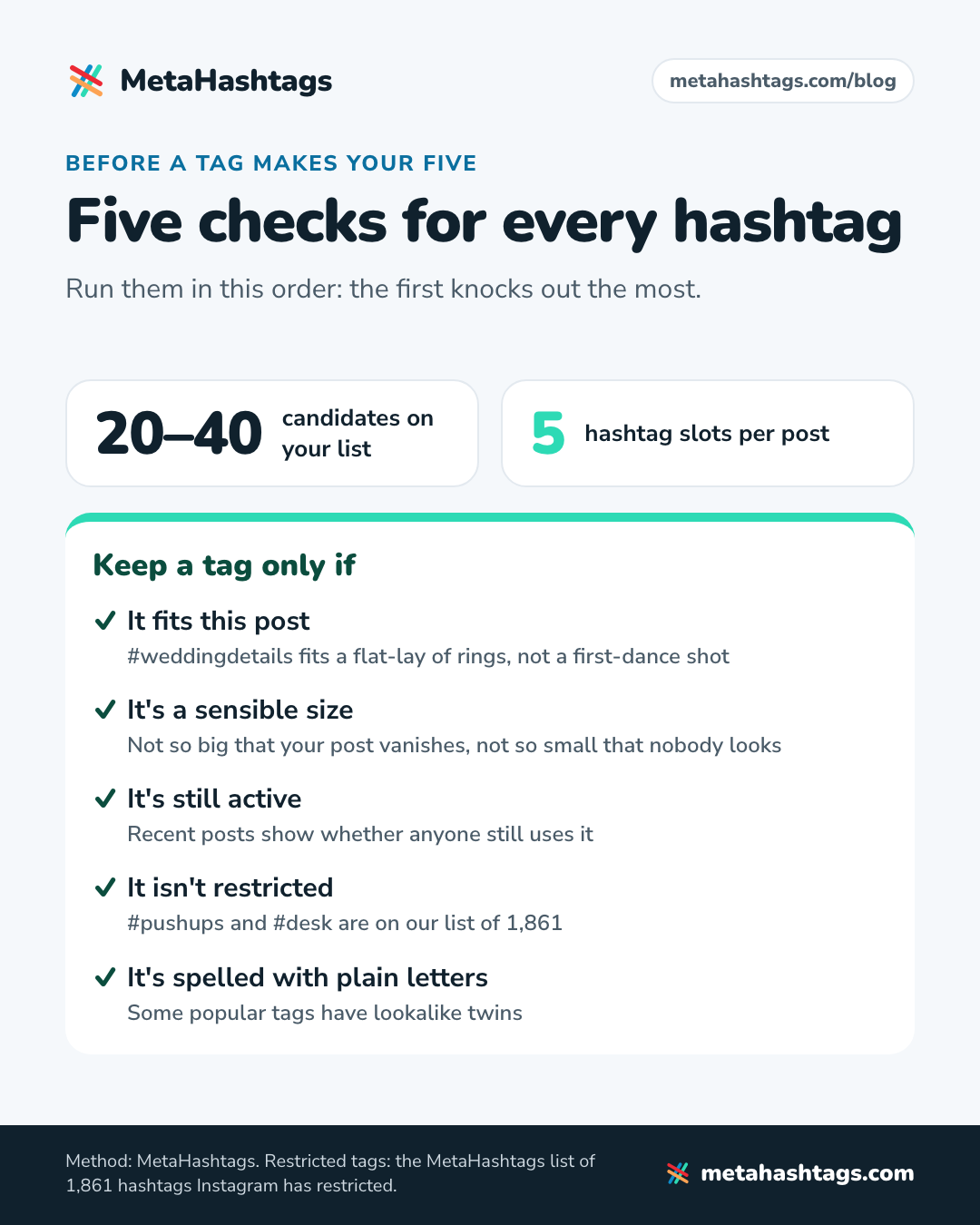
By now you probably have 20 to 40 candidates. Run each through these checks, in this order; the first knocks out the most.
- It fits this post. Would someone searching this tag be glad to land on this post? #weddingdetails fits a flat-lay of rings and invitations. It doesn’t fit a first-dance shot, even from the same wedding.
- It’s a sensible size. Not so big that your post vanishes, not so small that nobody looks.
- It’s still active. Post counts are all-time totals; recent posts show whether anyone still uses it.
- It isn’t restricted. Some ordinary-looking tags are hidden from search.
- It’s spelled with plain letters. Some popular tags have lookalike twins.
What post count is good for a hashtag?
Instagram doesn’t publish a number, and the guides that do disagree: Later’s 2026 guide calls 10K–200K the sweet spot, Tailwind says under 500K, others say under 100K. None says where its number comes from.
Here’s what the real distribution looks like. The MetaHashtags database holds 553,656 hashtags with an Instagram post count, in the same size bands our generator labels:
| Size band (posts) | Share of hashtags | How I’d use it |
|---|---|---|
| Huge: 100M+ | 0.06% (319 tags) | Skip |
| Big: 10M–100M | 0.9% | One at most, and only if it names your exact topic |
| Mid: 500K–10M | 12.2% | One or two, for the main topic |
| Niche: 10K–500K | 44.0% | Two or three: the core of your five |
| Tiny: under 10K | 42.6% | Only when it’s local or very specific |
Source: MetaHashtags data, October 2026. Another 0.2% of tags have no posts at all.
The hashtags everyone knows (#love, #instagood, #viral) are a tiny group, and about 87% (86.7%) of the tags in our database have fewer than 500,000 posts. In the niches I ran for this article, the tags that actually describe a post mostly sit in the Niche and Mid bands. That’s where most of your five should come from.
Why giant hashtags don’t work
I compared two snapshots of #viral in our database. On April 27, 2025 it had 988,579,798 posts. On October 19, 2026 it had 1,579,428,371. That’s about 1.09 million new posts a day on average, or roughly 13 every second. #reels added about 694,000 a day over a similar period, and #explorepage about 370,000.
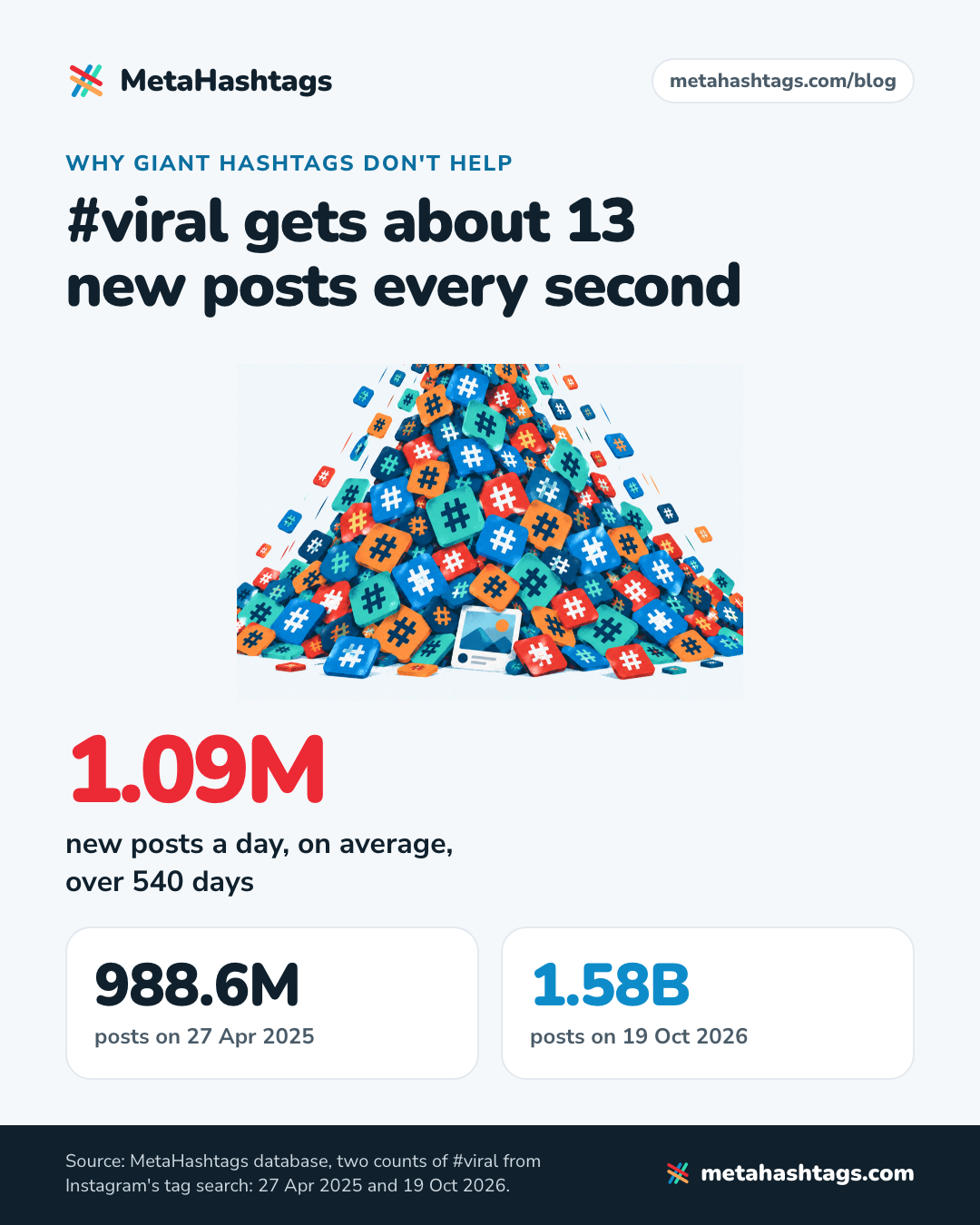
Those figures show how crowded a tag is, not how many people search it. Nobody looking for a sourdough baker types #viral.
Big numbers mislead in other ways too. #photooftheday went from 1,093,195,469 posts in May 2025 to 1,082,354,419 in October 2026: it shrank. And #love shows exactly 2,147,483,647 posts, which is the largest number a signed 32-bit integer can hold. Instagram’s counter for it has simply maxed out.
Is the hashtag still active?
Open the tag and look at how recent the posts near the top are. A tag with 400,000 posts and a stream from this week is alive; the same count with nothing newer than last spring is a museum. For a firmer answer, check the count twice, a few days apart, and see whether it moved. That’s also the simplest way of spotting a hashtag that’s on the rise.
Is the hashtag restricted?
Instagram’s wording: “Hashtags on Instagram may not be searchable if the text or the content associated with the hashtag consistently do not follow our Terms of Use or Community Standards.” It also says it reviews these tags periodically and may make one searchable again (Why you can’t search for certain hashtags on Instagram). There’s no official public list.
The catch is that restricted tags aren’t only the ones you’d expect. Our checker uses a curated list of 1,861 hashtags Instagram has restricted, including everyday words like #desk, #pushups, #petite, #boho, #beautyblogger and #kansas. A fitness coach would never guess #pushups. And Instagram restricts and un-restricts tags without announcing it, so check before each post. Paste your caption into our banned hashtag checker and it flags anything on the list.
A restricted tag is at best a wasted slot. For what Instagram actually documents about “shadowbans”, see our shadowban guide.
Is it spelled with plain letters?
#dogsofinstagram has 340,762,064 posts. Written with the “fi” ligature (a single character that looks like f and i), it’s a different hashtag with 976,940 posts. Written with a dotless “ı”, it’s another one with 323,989. They look identical in a caption and lead to different pages.
People land in these by copying from fancy-font tools and old lists. Generators (ours included) list them too, because they’re real tags with real post counts. So type your final five yourself, or paste them into a plain-text note first.
How to land on five
Once your candidates have passed the checks, give each of the five slots a role. This is the mix I’d start from:
- One topic tag: the plain name of what the post is about. Usually Mid, sometimes Big.
- Two or three niche hashtags: the technique, the format, the sub-topic or the community. Mostly from the Niche band.
- One specific tag: your city, an event, or your own branded tag.
If only four tags genuinely fit, use four. An empty slot costs nothing; a tag that doesn’t describe the post blurs what it’s about. Whether to always fill all five is a separate argument, and the studies on it disagree (all are correlational), so I’ve covered them in the piece on how many hashtags to use on Instagram.
To save time later, keep a short library: 10 to 15 checked tags for each kind of post you make regularly, and pick the five that fit each new post.
Worked examples with real post counts (October 2026)
All counts below are from MetaHashtags data, checked October 19, 2026. The people are hypothetical; the hashtags and numbers are real.
A sourdough bakery posting a scoring reel
I ran #sourdough through our generator. Its suggested five were #bread (21,125,413 posts), #sourdough (9,262,289), #sourdoughbread (3,745,946), #sourdoughstarter (1,281,078) and #sourdoughscoring (232,998). Fine for a generic sourdough post. For a scoring reel, I’d change two:
| Hashtag | Posts | Verdict |
|---|---|---|
| #sourdough | 9,262,289 | Keep: the topic tag |
| #sourdoughscoring | 232,998 | Keep: exactly what the reel shows |
| #sourdoughbaker | 150,379 | Add: who you are |
| #sourdoughbakery | 116,784 | Add: what you sell |
| #bread | 21,125,413 | Drop: too broad for this post |
| #sourdoughstarter | 1,281,078 | Drop: it’s about the starter, not scoring |
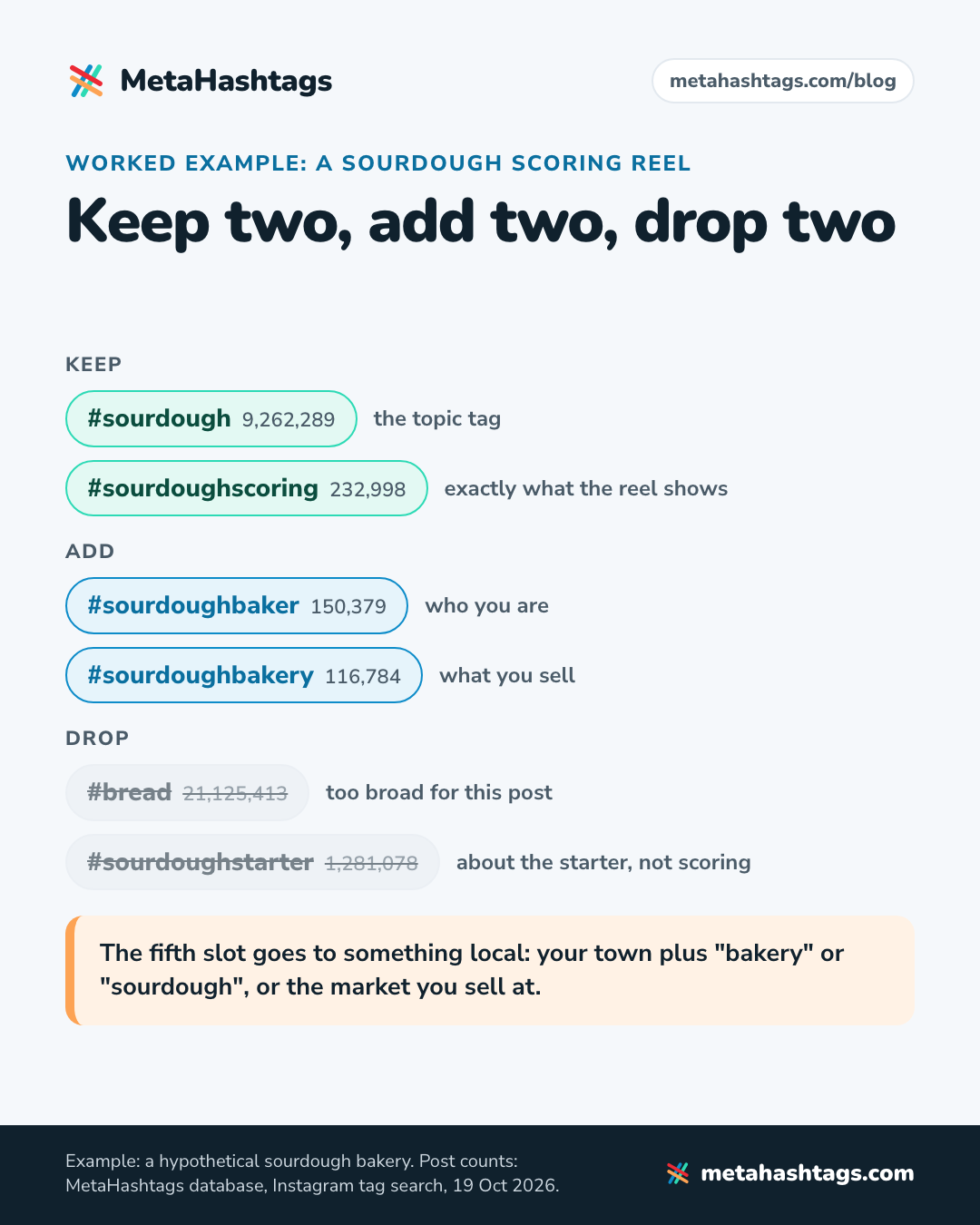
The fifth slot goes to something local: your town plus “bakery” or “sourdough”, or the market you sell at. Check its count first. A local tag with no posts has nobody browsing it, and the post’s location will do that job better.
Next week’s posts get different sets from the same library. A focaccia post might use #sourdoughfocaccia (75,076), and a recipe for using up discard might use #sourdoughdiscardrecipe (28,719).
A wedding photographer in a big city
Say you shoot weddings in London and you’re posting a ceremony photo from a city venue. The candidates:
- #weddingphotographer: 33,970,573 posts (Big)
- #weddingceremony: 4,465,609 (Mid)
- #weddingphotographersociety: 271,632 (Niche, a community tag)
- #weddingphotographeruk: 83,602 (Niche)
- #weddingphotographerlondon: 55,428 (Niche)
My five for the ceremony photo: #weddingphotographerlondon, #weddingphotographeruk, #weddingceremony, #weddingphotographersociety, and #weddingphotographer as the one big tag, because it’s the most obvious thing a couple might type when they start looking. If the venue has its own hashtag, it could take that last slot instead.
Now move the same photographer to Miami. #weddingphotographermiami has 6,799 posts, which puts it in the Tiny band. I’d use it anyway. My bet is that the few people browsing it are much more likely to be planning a Miami wedding than anyone scrolling a tag with 34 million posts.
A handmade jewelry shop
Say you make earrings and sell them online. Searching around #handmadejewelry turns up two giants first, #handmade (405,460,497) and #jewelry (132,585,942). Both are Huge: skip. What’s left is more useful:
- #handmadejewelry: 45,976,875 (Big, your one topic tag)
- #gemstonejewelry: 6,482,230 (only if the piece has stones)
- #handmadeearrings: 4,658,124 (Mid)
- #handmadejewelrydesigner: 95,994 (Niche)
- #handmadejewelryshop: 43,396 (Niche)
For stone earrings, all five fit. For a plain silver ring, #gemstonejewelry and #handmadeearrings are both wrong, so you’d swap in ring tags from your library instead of keeping them out of habit.
Hashtags for Reels, carousels and single photos
The cap covers “a caption for a reel or post”, so Reels, carousels and single photos all get five. Instagram hasn’t published separate hashtag rules for Reels; its Creators blog gives the same advice for everything: relevant keywords and hashtags in the caption.
The one change I’d make for video is a format tag, when the format is what people want. #nailarttutorial (529,034 posts), #homeworkoutvideos (210,353) and #bookstagramreels (227,089) are format tags with a real audience. #reels itself is not worth a slot: 1,431,016,941 posts, and all it says is that your video is a video.
For carousels, tag what the whole carousel is about, not one slide in the middle of it.
Caption or comments?
Caption. Instagram’s Creators blog says it directly: “To have your post found in Search, put these keywords and hashtags in the caption, not the comments.” (Creators blog).
The Help Center does allow hashtags in comments, and says a comment with more than five won’t post. It doesn’t say whether caption and comments share one budget of five. “Up to 5 tags on a post” reads like one budget to me, but that’s my reading, not something Instagram has confirmed. You’ll also see claims that the web version or some schedulers still accept more. I couldn’t confirm any of them, and a sixth tag wasn’t going to help anyway. Plan for five, in the caption.
Mistakes that waste your five
- Trimming an old 30-tag set to its first five, which are usually the biggest and least specific.
- Spending slots on #viral, #explorepage, #trending or #fyp (566,152,199 posts when we last checked it, in March 2025). They describe what you hope happens to the post, not what’s in it.
- The same five on every post. If your posts differ, so should the tags.
- Tagging your business instead of the post: #smallbusiness (165,829,820 posts) on every product photo tells nobody what the product is.
- Restricted tags you didn’t know about, and lookalike characters from fancy-font tools.
How to tell if your hashtags are working
Instagram doesn’t document a way to see how many views came from your hashtags. Its insights pages describe Views, Interactions and Profile activity per post, nothing hashtag-specific. Any tool showing “reach from hashtags” is estimating.
What you can check:
- Whether your post shows up. A day after posting, search one of your tags from another account and look for it. Only public accounts appear: “When people with private profiles tag posts, they won’t appear publicly on hashtag pages.”
- Your non-follower numbers. Insights split accounts engaged into followers and non-followers, and hashtag search is one way non-followers find you.
- A simple rotation. Over a few weeks, try two sets on similar posts and compare those non-follower numbers. It’s rough, but tags that keep turning up on your better posts earn their place in the library.
- Your library’s counts, every few months. Tags grow, shrink and get restricted; our guide to hashtag popularity explains what the numbers do and don’t tell you.
The routine, in short
- Write three to five phrases someone would search to find this post.
- Search them in Instagram, then tally the tags on 10 to 20 top posts and check how recent they are.
- Look at accounts your size in the same niche, and add local, event or community tags.
- Run a seed tag through a generator to fill gaps and get counts.
- Check every candidate: fits the post, sensible size, still active, not restricted, plain letters.
- Give the slots roles (one topic, two or three niche, one specific). Leave one empty rather than force it.
- Put them in the caption, next to the keywords from step 1.
FAQ
Can you still follow hashtags on Instagram?
No. Instagram announced in November 2024 that it was removing the option. You can still search hashtags and open hashtag pages, which is how you research them now.
What’s a good number of posts for a hashtag?
Instagram doesn’t publish one. My rule of thumb: most of your five between 10,000 and 500,000 posts, one or two up to 10 million, and at most one above that, only if it names your exact topic.
How often should I change my hashtags?
Whenever the post changes. Hashtags describe a single post, so a new topic, format or place means a new set, picked from your library.
Keep reading
-
 Instagram Hashtags
How to Use Hashtags on Instagram in 2026 (Now You Only Get Five)
Instagram now allows five hashtags per post. What they still do, where to put them, and how to pick the right five, with live… -
 Instagram Hashtags
Instagram SEO in 2026: How to Get Found in Search and on Google
How Instagram search actually works, what's confirmed and what's guesswork, why caption keywords matter more under the 5-hashtag cap, and how your posts end… -
 Instagram Hashtags
How to Check Hashtag Popularity (and What the Post Count Hides)
Where to find a hashtag's post count, what that number leaves out, and how to judge a tag's size, activity and risk, with data…