How to Use Hashtags on Instagram Reels in 2026 (You Get Five)
Reels are found through recommendations far more than hashtags. Here's how to pick the five tags you're allowed, with real post counts, and why #viral sets don't help.

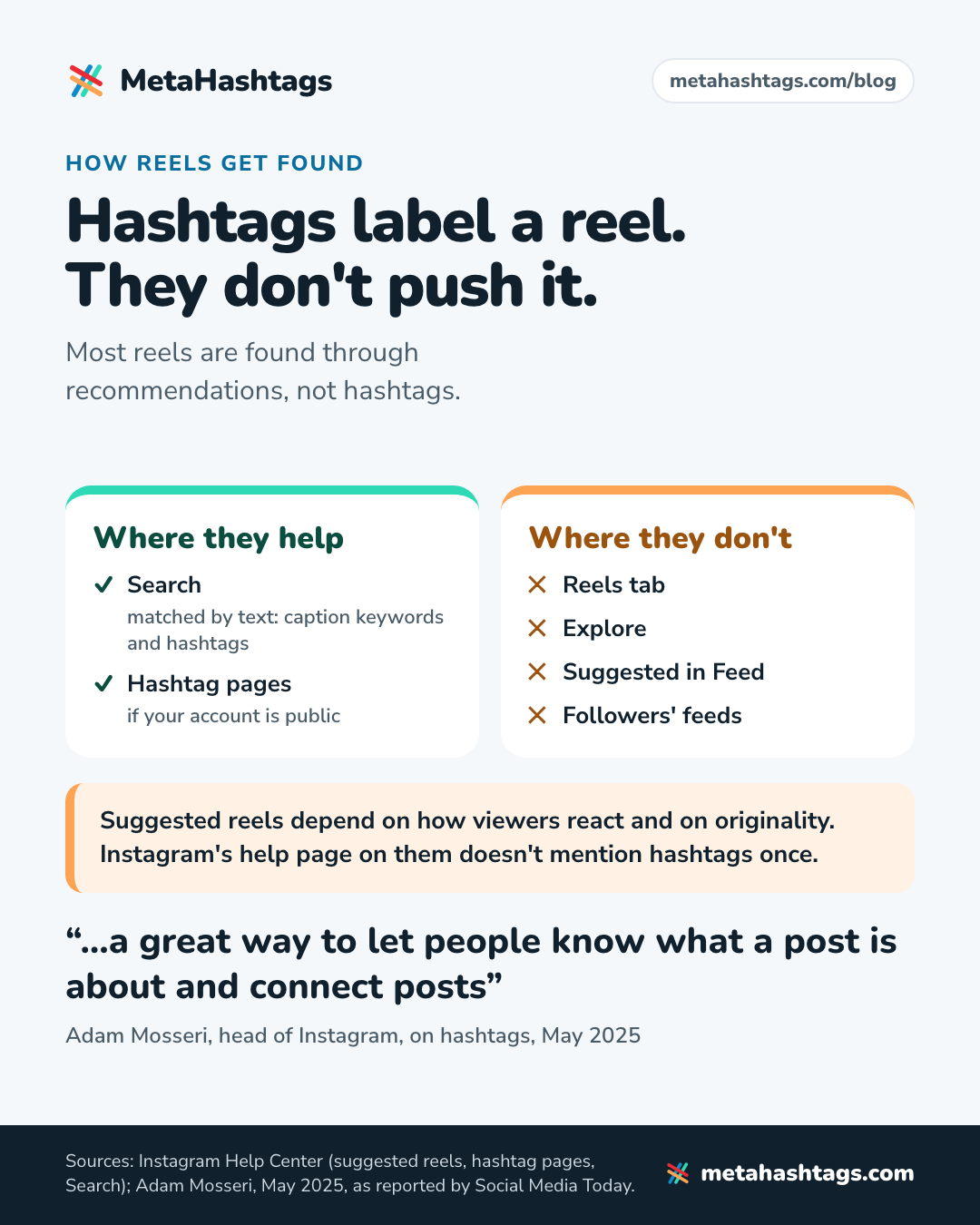
Hashtags won’t make a reel go viral. Most reels are found through recommendations in the Reels tab, Explore and people’s feeds, and Instagram’s own help page on how it picks those reels doesn’t mention hashtags once. What hashtags still do is tell Instagram and searchers what your reel is about. Since December 2025 you get five of them.
So here’s how to use hashtags on Instagram Reels in 2026: put up to five in the reel’s caption, not in the comments and not on the video. Pick tags that describe this reel the way someone would search for it: the topic, the format (#nailarttutorial, say), a niche or community tag, and a local one if you serve a place. Skip #reels, #viral and #explorepage.
The rest is the why, with post counts from our database (October 2026) and quotes from Instagram’s own help pages.
Do hashtags work on Instagram Reels?
For one job, yes. They label the reel. They don’t push it to more people.
Adam Mosseri, who runs Instagram, said in May 2025 that hashtags “don’t improve visibility on Instagram” but are “a great way to let people know what a post is about and connect posts” (as reported by Social Media Today). When Instagram cut the limit to five, it said “using fewer (up to 5) more targeted hashtags, rather than many generic ones, can improve both your content’s performance and people’s experience on Instagram” (Social Media Today, December 2025). Neither says more tags buy more reach.
Instagram’s Help Center page on suggested reels is even plainer. It recommends reels that “May be entertaining for a wide audience”, “Are filmed vertically” and use library music or original audio, and it shows less of reels that “Contain borders, logos, or watermarks”, “Have the majority of the image covered by text” or “Are not original videos” (Instagram Help Center). Hashtags aren’t on either list.
That doesn’t make them useless. If your account is public, a tag puts your reel on that hashtag’s page: “the post will be visible on the corresponding hashtag page” (Use hashtags on Instagram). Tags also feed Search. Instagram’s creator guidance says “Search results are matched by text” and tells you to put keywords and hashtags “in the caption, not the comments” (Instagram Creators blog, 2022, still the clearest thing Instagram has published on this).
As for studies, I couldn’t find a sound one on Reels specifically. SocialPilot’s claim that Reels without hashtags got 23% better reach comes with no stated sample, and a “47% more engagement” stat credited to Fanpage Karma isn’t on the Fanpage Karma page it points to (the nearest figure there, 43%, is about Reels that prompt comments). Be suspicious of any Reels hashtag percentage, including ones that agree with me.
My take: use hashtags on every reel, but spend two minutes on them, not twenty. The reel decides how far it travels.
How Reels get discovered, and where hashtags fit
Instagram says suggested reels show up “in places like the Reels tab, Explore, and in your feed,” picked “based on a variety of factors, including which accounts you follow and the reels you’ve watched, liked, or engaged with recently” (Instagram Help Center). That channel runs on what viewers do with your reel. Mosseri reportedly named watch time, likes per reach and sends per reach as the main signals in January 2025; I’ve only seen that relayed by trade press.
| Where a reel gets seen | What decides it | Do hashtags help? |
|---|---|---|
| Reels tab, Explore, suggested in Feed | How viewers react, originality, Recommendation Guidelines | Not in anything Instagram has published |
| Search | Text matches: caption keywords, hashtags, your name and handle | Yes |
| Hashtag pages | When it was posted, engagement, Recommendation Guidelines | Yes, that’s what they’re for |
| Followers’ feeds | They follow you | No |
Two changes older guides miss. You can’t follow a hashtag any more (Instagram announced its removal in November 2024), so tagging a reel no longer drops it into anyone’s feed. And length matters: reels can run 20 minutes, but Instagram’s own instructions say “Reels over 3 minutes won’t be recommended to new audiences” (Record a reel on Instagram). No hashtag fixes that.
How many hashtags can you use on a reel?
Five. Instagram’s December 18, 2025 announcement said it “will gradually update the number of hashtags that you can include in a caption for a reel or post to five.” It used to be 30, which is why so many Reels guides still tell you to use 20 or more.
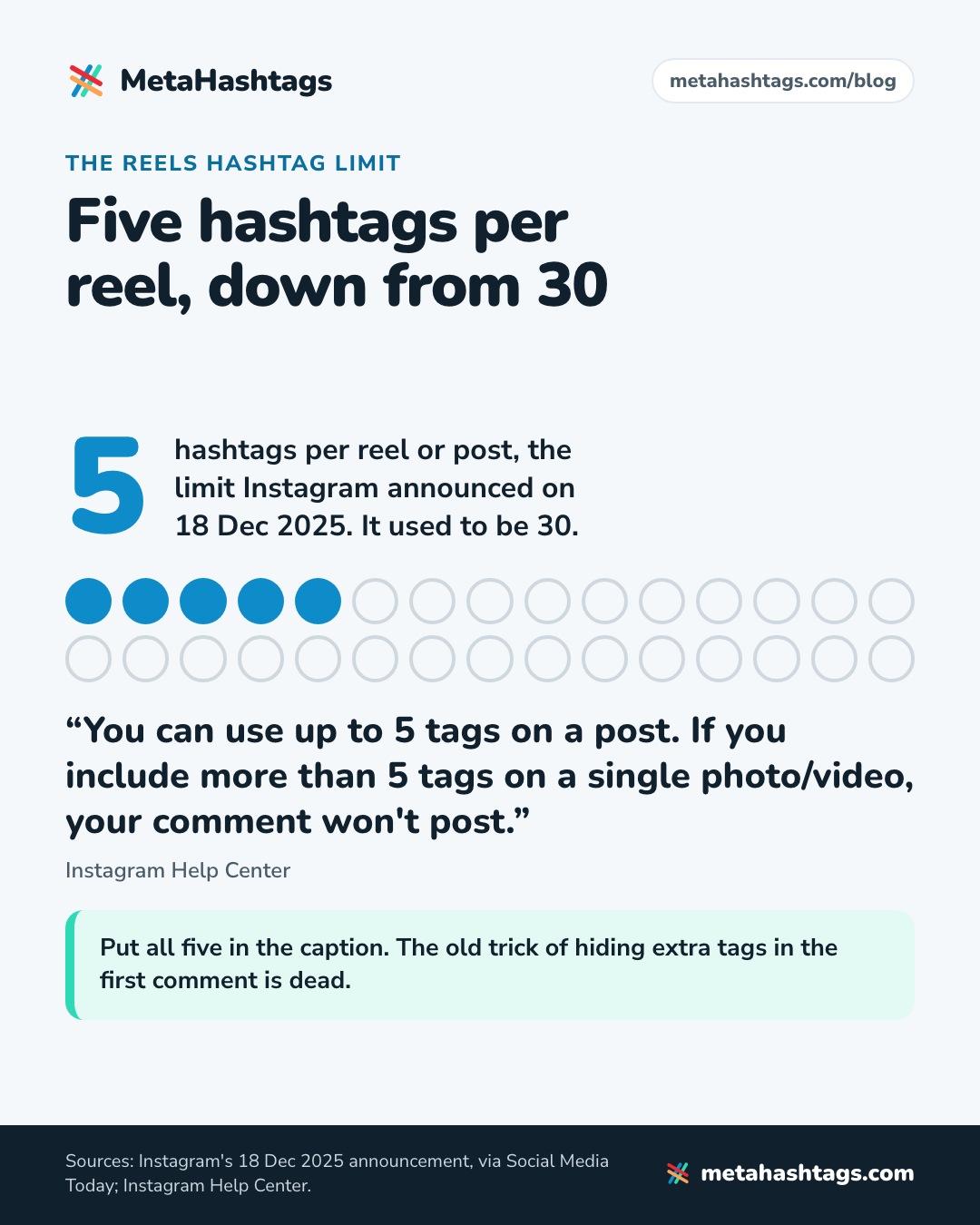
Instagram hasn’t said in so many words whether caption and comment hashtags share one budget of five. “5 tags on a post” suggests they do, and I’d plan as if they do.
Should you use all five? Only if five fit. A fifth tag has to earn its slot; if the best you can come up with is #instagood, stop at four. More on the number, and what the studies say, in how many hashtags to use on Instagram.
How to use hashtags on Instagram Reels, step by step
These follow the steps in Instagram’s Help Center guide to recording a reel, minus the menu details, which vary by app version:
- Tap Create and choose Reel. Record, or add a video from your camera roll.
- Edit, then tap Next until you reach the screen where you write a caption.
- Write a sentence or two that says what the reel is, in the words someone would search.
- Add up to five hashtags at the end. No spaces inside a tag; Instagram says “spaces and special characters, like $ or %, won’t work.”
- Check none is restricted (see below), then tap Share.
If you spot a typo later, Instagram’s Manage reels page is where to look. Instagram doesn’t say whether tags added after posting are treated differently.
Caption, comment or on screen?
Caption. Comments are allowed, but Instagram’s advice for Search is the caption, and the old trick of hiding 25 extra tags in the first comment is dead: a comment with more than five won’t post.
A hashtag burned into the video by an editing app is just pixels, and Instagram hasn’t said whether it reads on-screen text for search. Keep tags in the caption and any on-screen text short.
How to choose the best hashtags for a reel
1. Write down what someone would type to find it
Not what you’d call the reel. What a stranger would search: “wedding nails”, “nail art tutorial”, “home workout for moms”. Those phrases go into the caption as words, and they point you to your tags.
2. Gather candidates
Search those words on Instagram and note the tags on the reels that come up. Check what peers in your niche put on their best reels. Or run a seed tag through our Reels hashtag generator, which returns related tags with live Instagram post counts. There’s a longer walk-through in how to find hashtags that actually fit your posts.
3. Check the size
Most hashtags are smaller than people assume. Of the 553,656 hashtags in our database, only 319 have 100 million posts or more, and about 87% have fewer than 500,000.
I’d build most of a set from tags under about a million posts, with plenty in the 10K–500K range. Fewer new posts land on top of yours there, and anyone browsing a tag that specific wants exactly that thing. One big tag (10 million or more) that names the topic is fine.
4. Check it isn’t restricted, or a lookalike
Instagram makes some hashtags unsearchable when they’re consistently misused, and it doesn’t publish a list. Ours has 1,861 tags Instagram has restricted, including words you’d use innocently on a reel: #pushups, #beautyblogger, #boho. One is #reel, singular, with more than 100 million posts at our last check. #reels, plural, isn’t on it. Tags get restricted and lifted without notice, so check right before you post.
If you copied tags from a list or a fancy-font tool, check the spelling. #reelsınstagram, with a Turkish dotless ı, is a separate hashtag with 184,161 posts, and a version with an extra dot over the i has about 5.7 million. None of them show up under the real #reelsinstagram.
5. Build the five
- one tag for the topic (this can be the big one)
- one for the format: tutorial, routine, recipe, before-and-after
- two niche tags that say exactly what this reel shows
- one local or community tag, if you have one
Then build a fresh set for the next reel.
Two example sets, with real post counts
A nail tech’s bridal reel
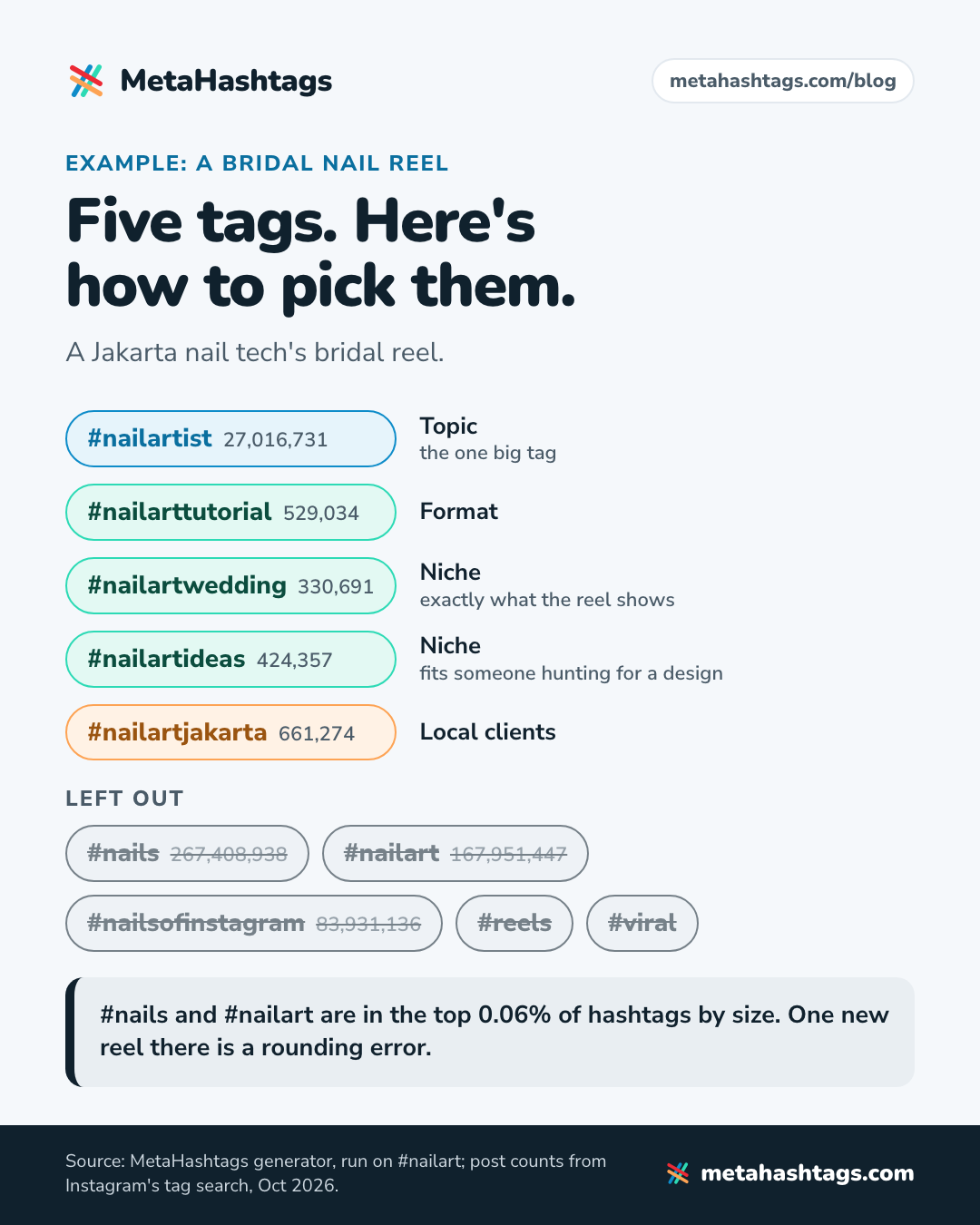
Say you do nails in Jakarta and you’ve filmed a 40-second bridal manicure, bare nail to finished set. I ran #nailart through our generator in October 2026. Here’s the set I’d use:
| Hashtag | Posts | Why it’s in |
|---|---|---|
| #nailartwedding | 330,691 | Exactly what the reel shows |
| #nailarttutorial | 529,034 | The format |
| #nailartideas | 424,357 | Fits someone hunting for a design |
| #nailartist | 27,016,731 | The one big tag, and it says who you are |
| #nailartjakarta | 661,274 | Local clients |
Left out: #nailart (167,951,447 posts) and #nails (267,408,938) are in the top 0.06% of hashtags by size, where one new reel is a rounding error. #nailsofinstagram (83,931,136) adds nothing #nailartist doesn’t. #reels and #viral describe nothing at all.
The city tags there are real: the same run turned up #nailartbandung (284,786 posts) and #nailartbali (218,097). Elsewhere, check that your city has a tag before you count on one.
A home workout reel
Now a 45-second clip from a no-equipment workout for new moms. From our #homeworkout run:
- #homeworkout (12,424,478 posts): the topic, and the one big tag
- #homeworkoutsformoms (20,702): the audience
- #homeworkoutroutine (27,764): what it is
- #homeworkoutvideos (210,353): the format
- #homefitness (1,247,360): a close neighbor with its own crowd
Left out: #homeworkouts (3,405,398), because the plural of a tag you already have wastes a fifth of your budget. #homegym (5,466,604), because there’s no gym in the reel. And #pushups, even if half the routine is push-ups, because it’s on our restricted list.
Viral Reels hashtags: what the numbers say
Every list of viral Reels hashtags hands you the same few tags. Here they are in our database:
| Hashtag | Posts (Oct 2026) | New posts per day |
|---|---|---|
| #viral | 1,579,428,371 | about 1.09 million |
| #reels | 1,431,016,941 | about 694,000 |
| #explorepage | 792,571,500 | about 370,000 |
| #trendingreels | 658,065,402 | not tracked |
| #reelsinstagram | 622,779,046 | not tracked |
| #viralreels | 566,795,303 | not tracked |
| #fyp | 566,152,199 (Mar 2025) | not tracked |
The per-day figures are averages between two checks of the same tag, 17 to 19 months apart. #viral went from 988,579,798 posts in April 2025 to 1,579,428,371 now, up 60%, or roughly 13 new posts a second.
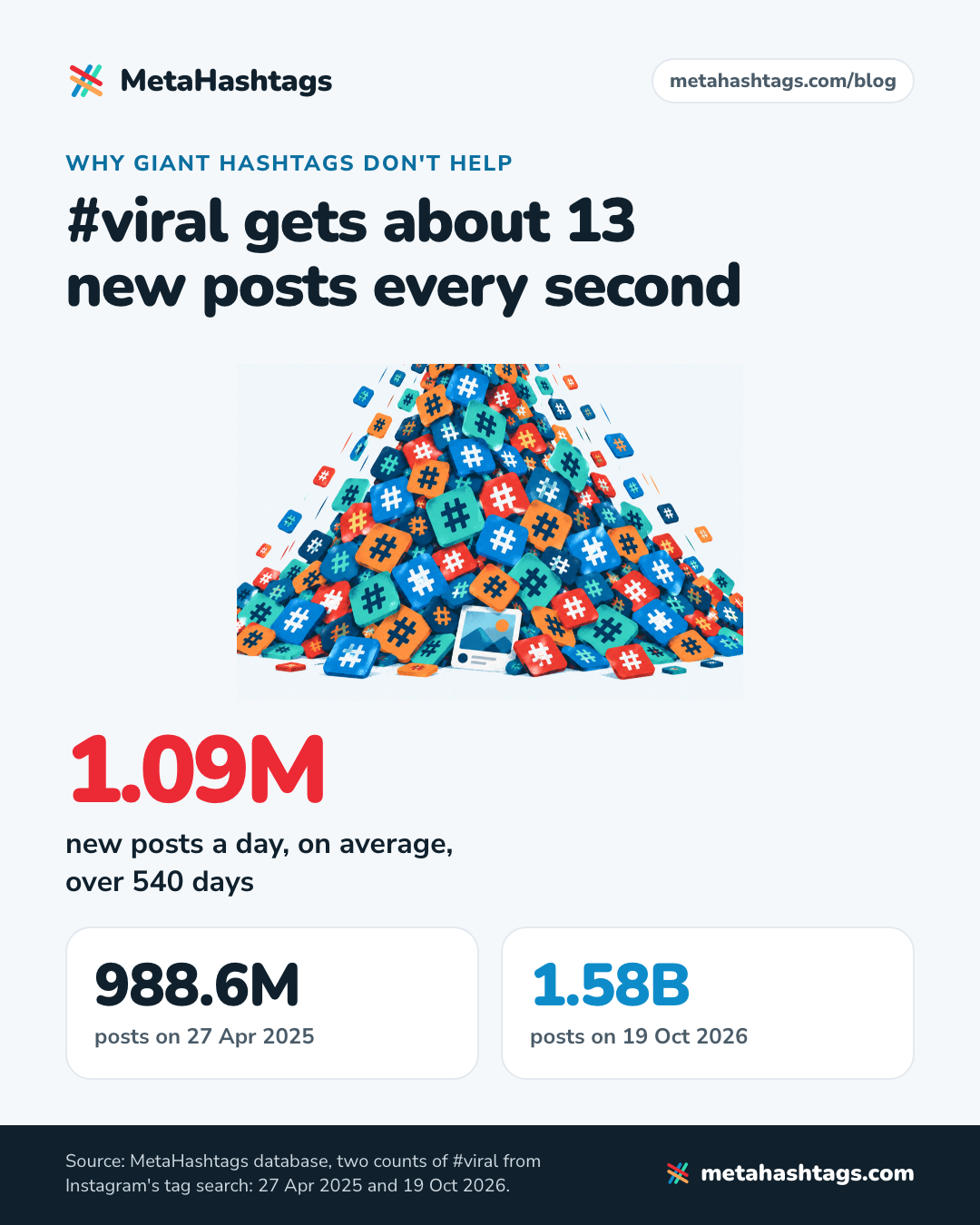
Instagram orders hashtag results by “When the post was shared”, “How others engage with the post” and “If content meets our Recommendation Guidelines” (How posts appear on hashtag search results). On #viral, your reel lands among about a million others posted the same day and gets ranked against them. Even if the page were purely chronological, 13 posts a second would bury it.
And these tags say nothing about the reel. #reels tells Instagram your reel is a reel. #viral and #explorepage are wishes. Instagram asked for “targeted” tags over “generic ones”, and nothing is more generic.
The stuffing shows in the data. Our database has #exlporepage at 784,766 posts, #expolrepage at 723,448 and #exporepage at 668,307: more than two million posts in misspellings of a tag Instagram has never said has anything to do with Explore.
#trending and #trendingreels are evergreen giants too, not what’s hot this week. For a tag that’s genuinely rising, here’s how to spot trending hashtags on Instagram by comparing counts a few days apart.
Beyond hashtags: what else helps a reel get found
With only five tags, the words around them carry more of the load.
- Caption keywords. Say what the reel is, early and in plain words: “Bridal nails, start to finish” is a line search can match. Our Instagram SEO guide covers how search works, including how public reels from professional accounts can show up on Google.
- Spoken words and on-screen text. Instagram hasn’t said whether it uses either for search. Subtitles still help anyone watching with the sound off.
- Audio. Instagram favors library music or original audio. Its trending audio list (up to 50 tracks, in your dashboard) is US-only and mobile-only, per the Help Center. Use a trending track only if it suits the reel.
- Originality. If you cross-post from TikTok, upload your clean file, not the watermarked download.
- Topics. Some creators report an option to add topics when posting a reel. Instagram’s posting instructions don’t mention it, so use it if you see it.
Hashtags to leave off your Reels
- #reels, #reelsinstagram, #instareels: every reel is a reel.
- #viral, #explorepage, #trendingreels, #viralreels: engagement bait. #viral is the fastest-growing tag in our snapshots, adding about a million posts a day.
- #fyp and #foryou: TikTok’s vocabulary.
- Restricted tags like #reel and #pushups, and lookalikes from fancy-font tools.
How to tell if your hashtags are doing anything
Instagram doesn’t document a way to see how many views came from hashtags, and none of the reel insights (views, watch time, viewers, follows) isolates them. Two cheap checks instead:
- A few hours after posting, open one of your niche tags and look for the reel. If it’s missing, check that your account is public, the tag is spelled right and it isn’t restricted.
- Over your next eight or ten reels, alternate two sets on similar content and compare views and follows. It’s rough, but it’s about your account, not someone else’s average.
Reels hashtag FAQ
Do hashtags work on Reels from a private account?
Not on hashtag pages. Instagram says that when people with private profiles tag posts, they “won’t appear publicly on hashtag pages” (Instagram Help Center).
Should I use the same hashtags on Reels and TikTok?
Same thinking, and TikTok has had its own five-hashtag limit since 2025. Check the Instagram counts, though, and leave #fyp behind.
Can I still follow a hashtag to see Reels?
No. Instagram announced the removal in November 2024. You can still search a tag and browse its page.
Before you tap Share
- The caption’s first line says what the reel is, in words people search.
- Five tags or fewer, all in the caption.
- Most have under about a million posts; at most one has more than 10 million.
- None is restricted, misspelled or a lookalike.
- No #reels, #viral, #explorepage or #fyp.
- Your account is public.
- Under three minutes, if you want new audiences to see it.
- An original upload, with no watermark.
The rules for regular posts and carousels, branded hashtags included, are in our main guide to Instagram hashtags.
Keep reading
-
 Instagram Hashtags
How Many Hashtags on Instagram in 2026? Five, and How to Pick Them
Instagram now allows five hashtags per post, not 30. What changed, what happens if you add a sixth, what the studies say about using… -
 Instagram Hashtags
How to Find Hashtags for Instagram (and Choose Your 5) in 2026
A method, not a list: where to find hashtag ideas inside Instagram, five checks for every candidate, and how to land on five, with… -
 Instagram Hashtags
How to Find Trending Hashtags on Instagram When There’s No List
Instagram doesn't publish a trending hashtags list, and most lists online are old giants. Here's where Instagram shows trends and how to check a…