How to Find Trending Hashtags on Instagram When There’s No List
Instagram doesn't publish a trending hashtags list, and most lists online are old giants. Here's where Instagram shows trends and how to check a tag is rising.

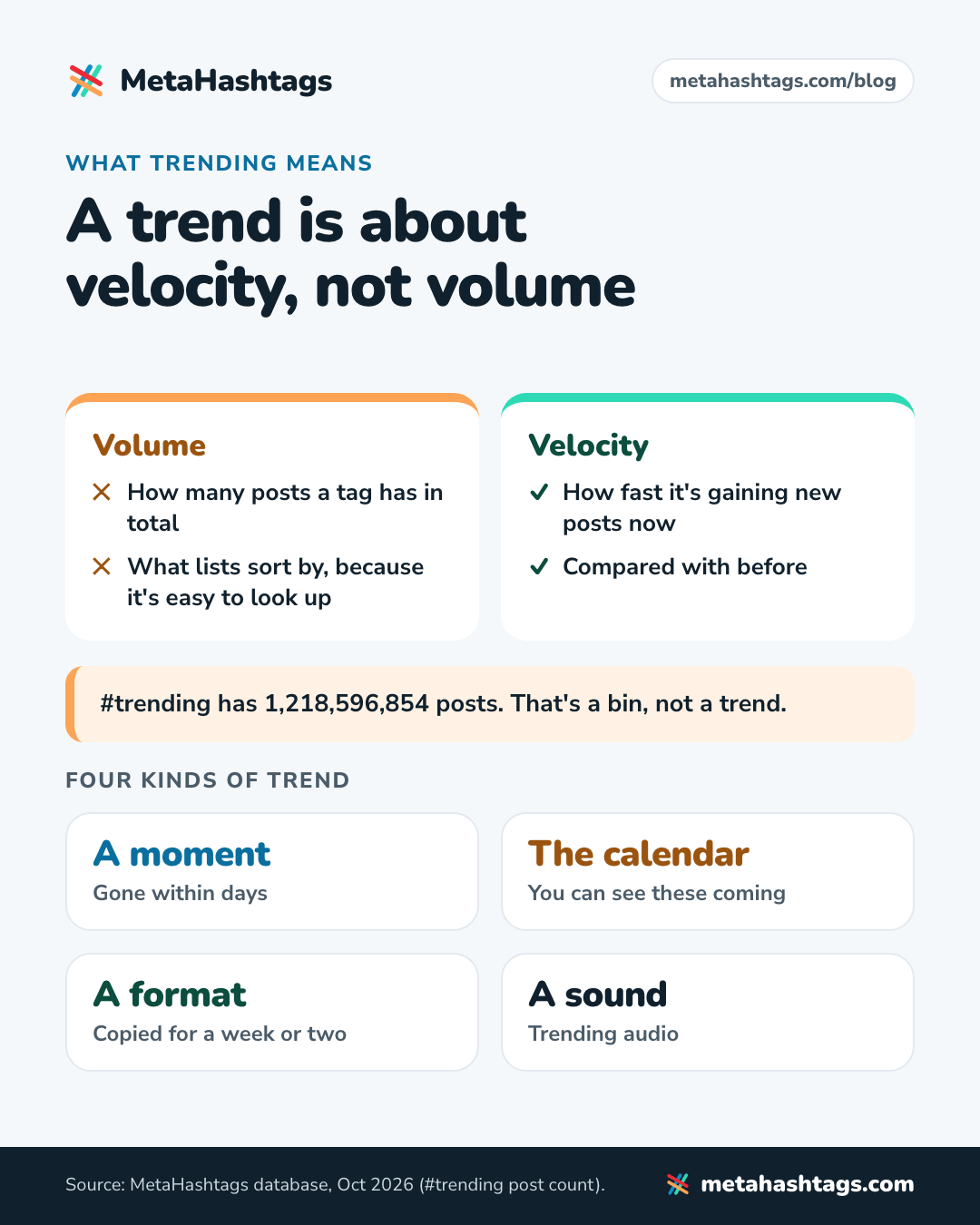
Instagram doesn’t publish a list of trending hashtags. There’s no trending tab for tags and no official top 50, and the “trending hashtags today” lists that rank on Google are mostly giant tags that have been big for years. #trending itself has 1,218,596,854 posts. That’s a bin, not a trend.
So learning how to find trending hashtags on Instagram comes down to two skills: knowing where Instagram actually shows what’s trending (mostly audio and Reels, not hashtags), and checking that a hashtag is growing before you give it one of your five slots.
Short answer: Instagram has no public list of trending hashtags. To find one, start where Instagram does show trends (trending audio, Reels, Explore, search suggestions), note the hashtags people attach to those posts, then check each one’s post count a few days apart. A tag that’s speeding up, has fresh posts and isn’t restricted is trending.
All post counts below are MetaHashtags data from October 2026.
Why most Instagram trending hashtags lists are wrong
I read several of the guides currently ranking for this search. None of their hashtag lists said where the tags came from or when they were counted. One, dated April 2026, still says you can use 30 hashtags and should follow hashtags to spot trends. Instagram had changed both before it was published.
The lists lean on the same few names. Here’s how big they are in our database:
- #viral: 1,579,428,371 posts
- #reels: 1,431,016,941 posts
- #trending: 1,218,596,854 posts
- #explore: 1,030,474,057 posts
- #explorepage: 792,571,500 posts
- #trendingreels: 658,065,402 posts
- #fyp: 566,152,199 posts (checked March 2025; it’s borrowed from TikTok)
These are evergreen giants that sound like trends because of their names, not because anything is happening under them. Only 319 of the 553,656 hashtags in our database have more than 100 million posts, and copy-paste lists keep recycling that small group.
They’re also hopeless for getting seen. Between April 2025 and this month, #viral gained about 1.09 million posts a day on average, roughly 13 every second. Yours would be somewhere in that pile.
What “trending” actually means on Instagram
Volume is how many posts a hashtag has in total. Velocity is how fast it’s gaining new ones now, compared with before. Lists sort by volume because it’s easy to look up. A trend is about velocity.
I’d sort Instagram trends into four kinds:
- A moment: a news story, a launch, a match, a meme. Gone within days.
- The calendar: holidays, seasons, back-to-school. You can see these coming.
- A format: a Reel template or editing style everyone copies for a week or two.
- A sound: trending audio, the kind of trend Instagram documents most clearly.
My take: in 2026, Instagram trends live mostly in sounds and formats. The hashtag is a label people add afterwards, if they bother. So go trend first, hashtag second: find what’s moving, then see which tags people attach to it.
Three changes that make old trending-hashtag advice wrong
You get five hashtags, not 30
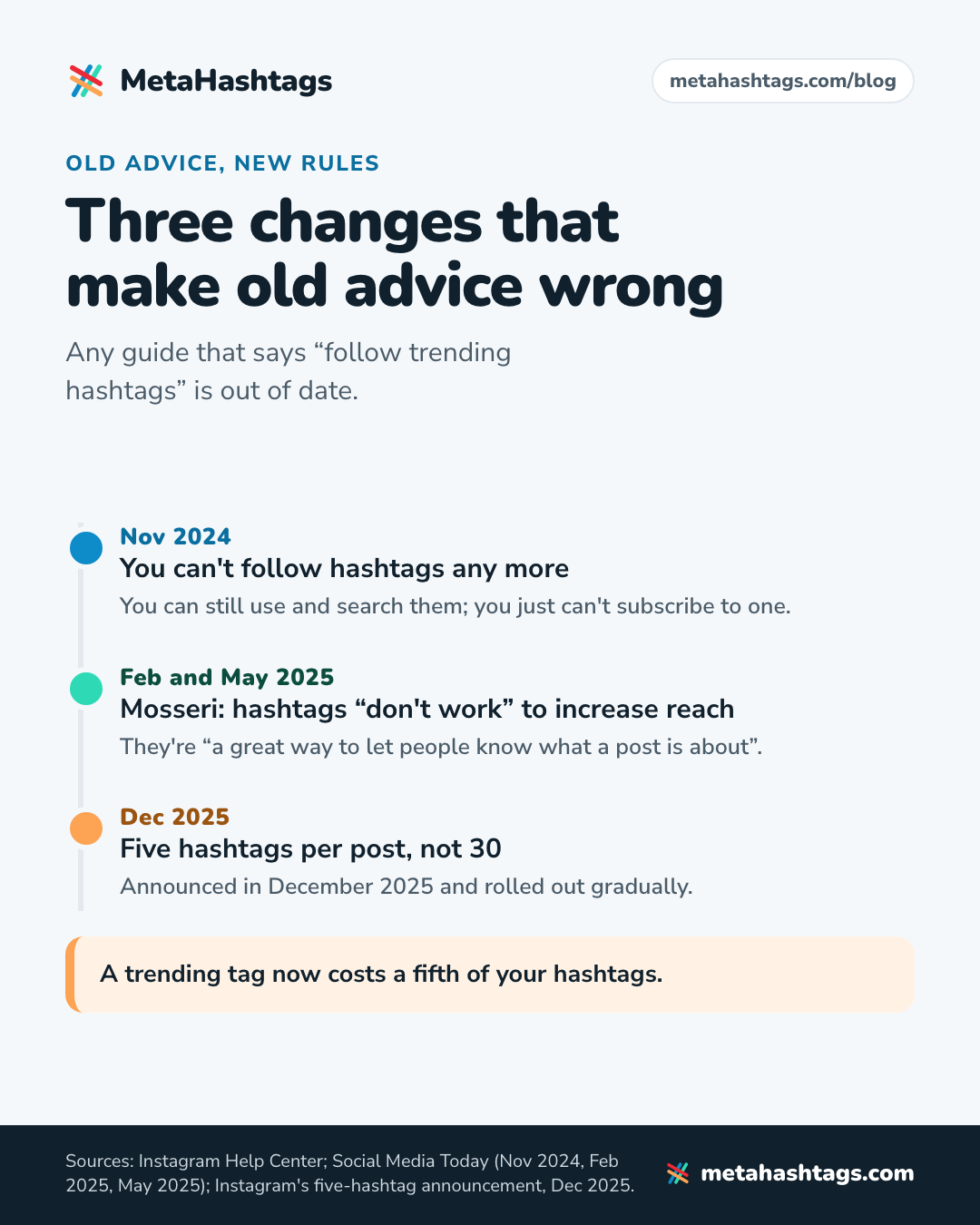
Instagram’s Help Center now says: “You can use up to 5 tags on a post. If you include more than 5 tags on a single photo/video, your comment won’t post.” (Use hashtags on Instagram). The cap was announced in December 2025 and rolled out gradually. A trending tag now costs a fifth of your hashtags.
You can’t follow hashtags any more
Instagram told Social Media Today in November 2024 that it was removing the option. You can still use and search hashtags; you just can’t subscribe to one. Any guide that says “follow trending hashtags” is out of date.
Hashtags describe a post; they don’t push it further
Adam Mosseri, the head of Instagram, said in February 2025 that hashtags “don’t work” to increase reach, and in May 2025 that they’re “a great way to let people know what a post is about and connect posts” (both relayed by Social Media Today). A trending tag won’t send your post to more people by itself. It puts a public post on that hashtag’s page and tells Instagram what the post is about.
The rest of the current rules are in our guide on how to use hashtags on Instagram.
Where Instagram shows what’s trending (and where it doesn’t)
Here’s every official trend surface I could find. “Help Center” means I read it there in October 2026; the rest comes from older Instagram posts or third-party guides, so check your own app.
| Where | What it shows | Status (Oct 2026) |
|---|---|---|
| Trending audio (your dashboard) | Up to 50 trending audio tracks | Help Center. US and mobile app only |
| Reels Trends | Trending songs, topics and hashtags on Reels | Reported in 2023 and 2025 (US only). Not in the Help Center; unverified |
| Inspiration (Professional dashboard) | Reels popular with your audience, trending songs and audio | Instagram Creators blog, May 2024. Current layout unverified |
| Reel Templates | Templates grouped under “Trending” | Third-party guide, 2025. Unverified |
| Edits app, Inspiration | Reels and audio to save for later | Third-party guide, 2025. Unverified |
| Explore and search | Recommended posts; hashtag and keyword results | Help Center |
| A trending hashtags page | Doesn’t exist | No official list found |
Trending audio: the one Instagram documents
The Help Center says: “This feature is only available in the US and on the Instagram mobile app. If you have a public (personal or professional) account, you can find up to 50 audio tracks currently trending on Instagram and use them in your content.” (Find and use trending audio on Instagram). Go to your profile, open your Professional dashboard (Your dashboard on a personal account) and look for Trending audio. In Reels, the Help Center says to look for the arrow next to the audio name.
If you make Reels, start here: the sound carries the trend, and your hashtags just describe your version of it. Our guide to hashtags for Instagram Reels covers picking them.
Reels Trends: the only place that showed hashtags
In April 2023, TechCrunch reported a “Check today’s Reels Trends” option in the Professional Dashboard, where creators could “see what the top trending topics and hashtags are on Reels”. That’s the closest Instagram has come to an official trending hashtags list.
A Buffer guide from July 2025 found Reels Trends in the menu behind the three lines on your profile, showing trending sounds and hashtags to US-based users only. It isn’t in the Help Center, and I couldn’t confirm it’s still there in October 2026 or available outside the US. If you see it, use it.
Inspiration, Templates and Edits
Instagram’s Creators blog announced Inspiration in May 2024: “By tapping ‘Inspiration’ in your Professional Dashboard menu you will find ideas tailored to you.” You can “bookmark trending songs & audio clips” there. Hashtags aren’t mentioned. Buffer also lists the Templates tab when you start a new reel (with a “Trending” group) and the Inspiration feed in Edits, Instagram’s video-editing app. Both point to formats, not tags.
Explore, search and hashtag pages
Explore is personalized, so it shows what’s popular in your corner of Instagram, not Instagram as a whole. Search is better for hashtags: type a topic word, look at the hashtags Instagram suggests, and open the ones that fit.
The Help Center says posts in hashtag results are ordered by “When the post was shared”, “How others engage with the post” and “If content meets our Recommendation Guidelines” (How posts appear on hashtag search results). So if even the posts near the top of a tag are weeks old, few people are piling in.
How to find trending hashtags on Instagram, step by step
This is the method I’d use with no paid tools.
- Start from a trend, not a hashtag. Pick something from your trending audio list, the Reels you keep seeing, the calendar or news in your niche. Write it down in plain words, like “pumpkin bread”.
- Collect candidates. Search those words on Instagram and note the hashtags it suggests. Open recent posts about the trend and note which tags repeat across different accounts. Five to ten candidates is plenty.
- Log each tag’s post count, with the date. Our generator shows the live count Instagram’s own tag search returns; a notes app is fine for the log. What a count does and doesn’t tell you is covered in our guide to checking hashtag popularity.
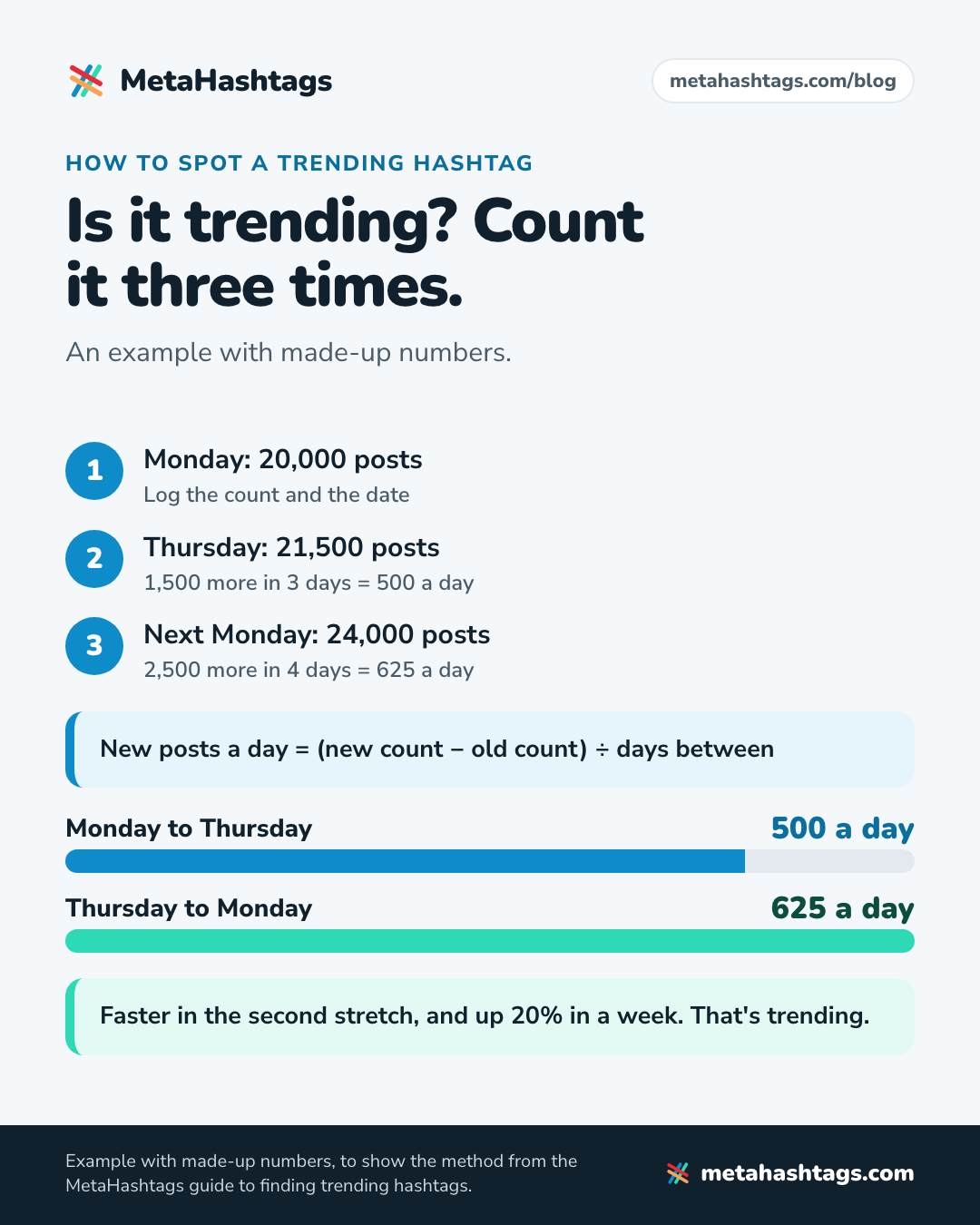
- Check twice more. Look again three or four days later, and a week after the first check. For each stretch, work out new posts per day: new count minus old count, divided by the days between. If the second stretch is faster than the first, and the growth is big for the tag’s size, it’s trending.
- Look at the posts. Open the hashtag. Fresh, on-topic posts from real accounts are a good sign. Weeks-old posts or a wall of spam are not.
- Make sure it isn’t restricted. The Help Center says hashtags “may not be searchable if the text or the content associated with the hashtag consistently do not follow our Terms of Use or Community Standards” (Why you can’t search for certain hashtags). There’s no official list, so paste your candidates into our banned hashtag checker before you post.
- Ask if your post fits. If someone browsing that tag would be glad to find your post, use it. If you’d have to stretch the post to justify the tag, skip it.
Here’s the arithmetic with made-up numbers. Say a tag had 20,000 posts on a Monday, 21,500 on Thursday and 24,000 the next Monday. That’s 500 new posts a day, then 625 a day. It’s speeding up, and it grew 20% in a week.
Big and growing is not the same as trending
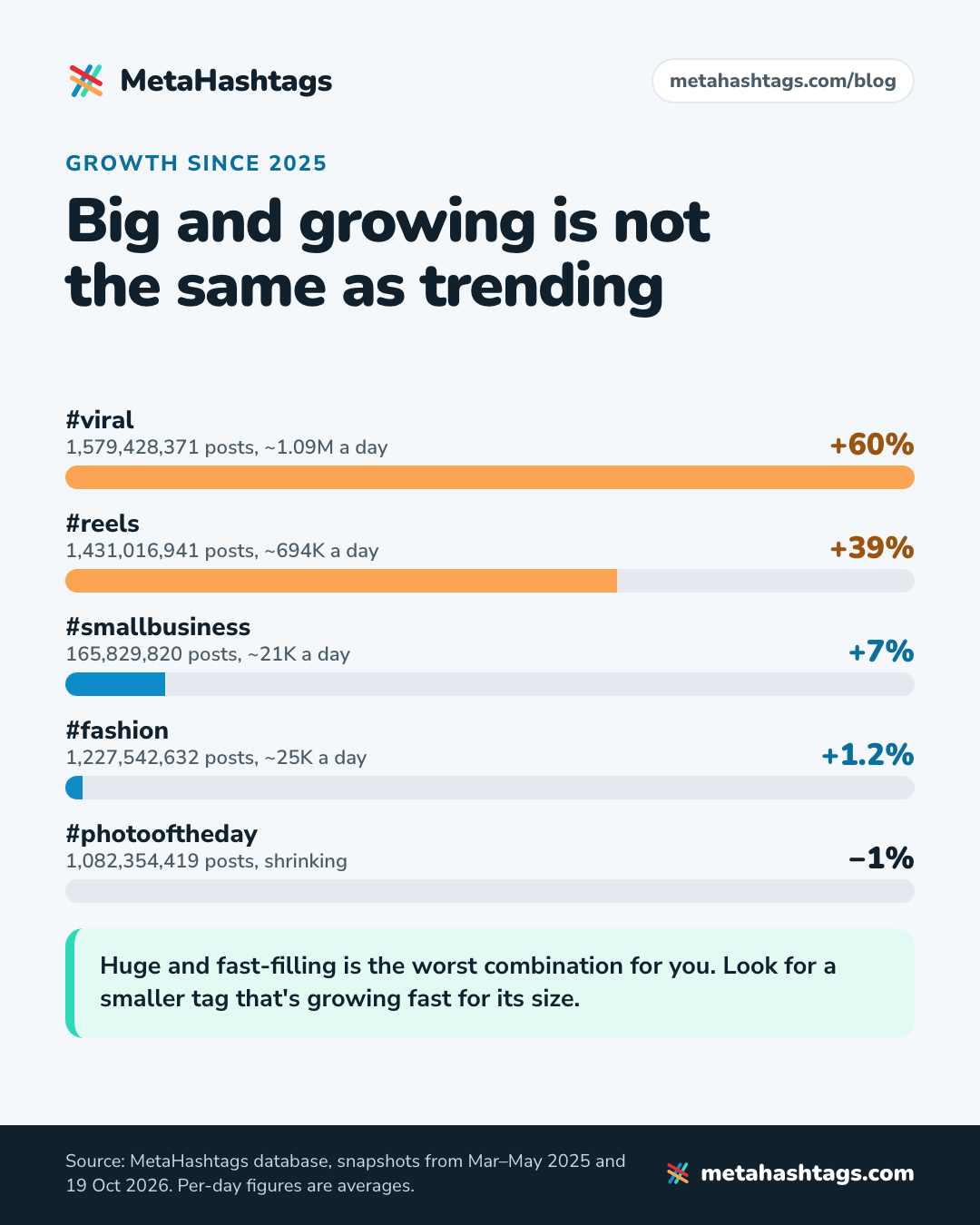
Giant tags always look busy. Here are two snapshots of the same tags from our database:
| Hashtag | Posts, 19 Oct 2026 | Change since 2025 | New posts a day |
|---|---|---|---|
| #viral | 1,579,428,371 | +60% | ~1.09M |
| #reels | 1,431,016,941 | +39% | ~694K |
| #explorepage | 792,571,500 | +33% | ~370K |
| #smallbusiness | 165,829,820 | +7% | ~21K |
| #fashion | 1,227,542,632 | +1.2% | ~25K |
| #photooftheday | 1,082,354,419 | −1% | shrinking |
Earlier counts were taken between March and May 2025; per-day figures are averages between the two snapshots, not daily measurements.
#fashion adds about 25,000 posts a day, more than #smallbusiness, yet it has grown 1.2% in a year and a half. #photooftheday is shrinking. #viral grew 60%, but not because anything happened: people keep adding it out of habit. Huge and fast-filling is the worst combination for you, because that’s where a post sinks fastest. You want a smaller tag that’s growing fast for its size, and faster this week than last.
Seasonal and event hashtags: the trends you can see coming
The easiest trends to catch are on the calendar. Holidays, seasons, sports finals and local festivals come round every year, so you can shoot early and run the count check in the run-up to see when a tag starts climbing.
One warning from our data: seasonal tags aren’t automatically safe. #happythanksgiving and #snowstorm are on our list of hashtags Instagram has restricted, and so, oddly, is #kansas. Instagram restricts and un-restricts tags without announcing it, so check close to the day.
A restricted hashtag is a different problem from what people call a shadowban, which is about whether your account can be recommended at all. If your reach drops across the board, read our Instagram shadowban guide before blaming a hashtag.
Outside tools: what they can and can’t tell you
- TikTok’s Creative Center lists trending TikTok hashtags. Formats often cross over to Reels, so it’s worth a look, but the tags are TikTok’s.
- Google Trends shows what people search for on Google. Good for timing seasonal posts; no help choosing Instagram hashtags.
- Social listening tools are good for tracking your own branded hashtag or a competitor’s campaign. Their “trending on Instagram” lists come from their own data collection, because Instagram doesn’t publish one.
- Hashtag generators, ours included, give you related tags and current counts. One count is a snapshot; you need at least two, a few days apart.
- Blog lists need a date, a method and post counts. If one is missing, don’t paste the list.
Turn a trend into your five hashtags
With five slots, a trend should mostly change what you post: the topic, the sound, the format, the caption. Your hashtags still have to describe the post itself. Give at most one slot to a trend or event tag, and only if it passed the checks above.
Say you run a sourdough micro-bakery in Portland, and a sound in your trending audio list suits a slow-motion scoring reel. The sound is the trend. None of your hashtags needs the word “trending”. Five that describe the reel, with counts from our database:
- #sourdoughscoring (232,998 posts): exactly what the reel shows
- #sourdoughbread (3,745,946 posts): the broader topic
- #sourdoughbaking (1,153,446 posts): the activity
- #sourdoughbakery (116,784 posts): what the business is
- #sourdoughsunday (14,851 posts): only if you post it on a Sunday
If a real event tag is climbing, say a local bread festival’s, swap it in for the weakest of the five. Don’t swap in #trending, #viral or #explorepage; they say nothing about the reel.
Put the words people would search for in the caption too. Instagram’s Creators blog says that to be found in Search, keywords and hashtags belong in the caption, not the comments. For everyday posts with no trend involved, here’s how to find hashtags for Instagram from scratch.
Trend-chasing mistakes to avoid
- Pasting a “trending hashtags today” list with no date. For all you know it’s from 2022.
- Keeping a trend tag for weeks after it peaked. Re-check the count before reusing it.
- Using a trend that has nothing to do with your post. People browsing the tag won’t care, and it tells Instagram the wrong thing about what you made.
How to tell whether a trend helped
Instagram doesn’t document a way to see how many views came from your hashtags, and I couldn’t find the per-hashtag reach some guides promise in anything Instagram or Meta has published. Insights does show views, and accounts engaged split into followers and non-followers. If your trend posts reach noticeably more non-followers than similar posts, across several posts rather than one, the trend helped.
FAQ
Does Instagram have a trending hashtags page?
No. The closest thing was Reels Trends, reported in 2023 and 2025 as US-only, and I couldn’t confirm it’s still live.
How can I see trending hashtags today?
Start from trending audio (US only), Reels and Explore, note the hashtags on posts about the trend, and compare their counts over a few days. Any website list of “today’s” trending tags is someone else’s estimate.
Do trending hashtags increase reach?
Not by themselves. Mosseri said in 2025 that hashtags don’t work to increase reach; they help people understand what a post is about. A trending tag helps only if your post fits it.
Keep reading
-
 Instagram Hashtags
How to Use Hashtags on Instagram in 2026 (Now You Only Get Five)
Instagram now allows five hashtags per post. What they still do, where to put them, and how to pick the right five, with live… -
 Instagram Hashtags
How to Use Hashtags on Instagram Reels in 2026 (You Get Five)
Reels are found through recommendations far more than hashtags. Here's how to pick the five tags you're allowed, with real post counts, and why… -
 Instagram Hashtags
How to Check Hashtag Popularity (and What the Post Count Hides)
Where to find a hashtag's post count, what that number leaves out, and how to judge a tag's size, activity and risk, with data…