Instagram Hashtag Analytics in 2026: What You Can (and Can’t) Measure
Instagram doesn't document a views-from-hashtags number. Here's what Insights and hashtag trackers can really measure, plus a free spreadsheet test you can run.

For years, guides to Instagram hashtag analytics gave the same instruction: open a post’s insights and read how many impressions came from hashtags. In 2026 that advice doesn’t hold up. Views replaced impressions, Instagram’s Help Center doesn’t document any hashtag source number, and the tools selling “hashtag reach” are working from data Instagram doesn’t actually give them.
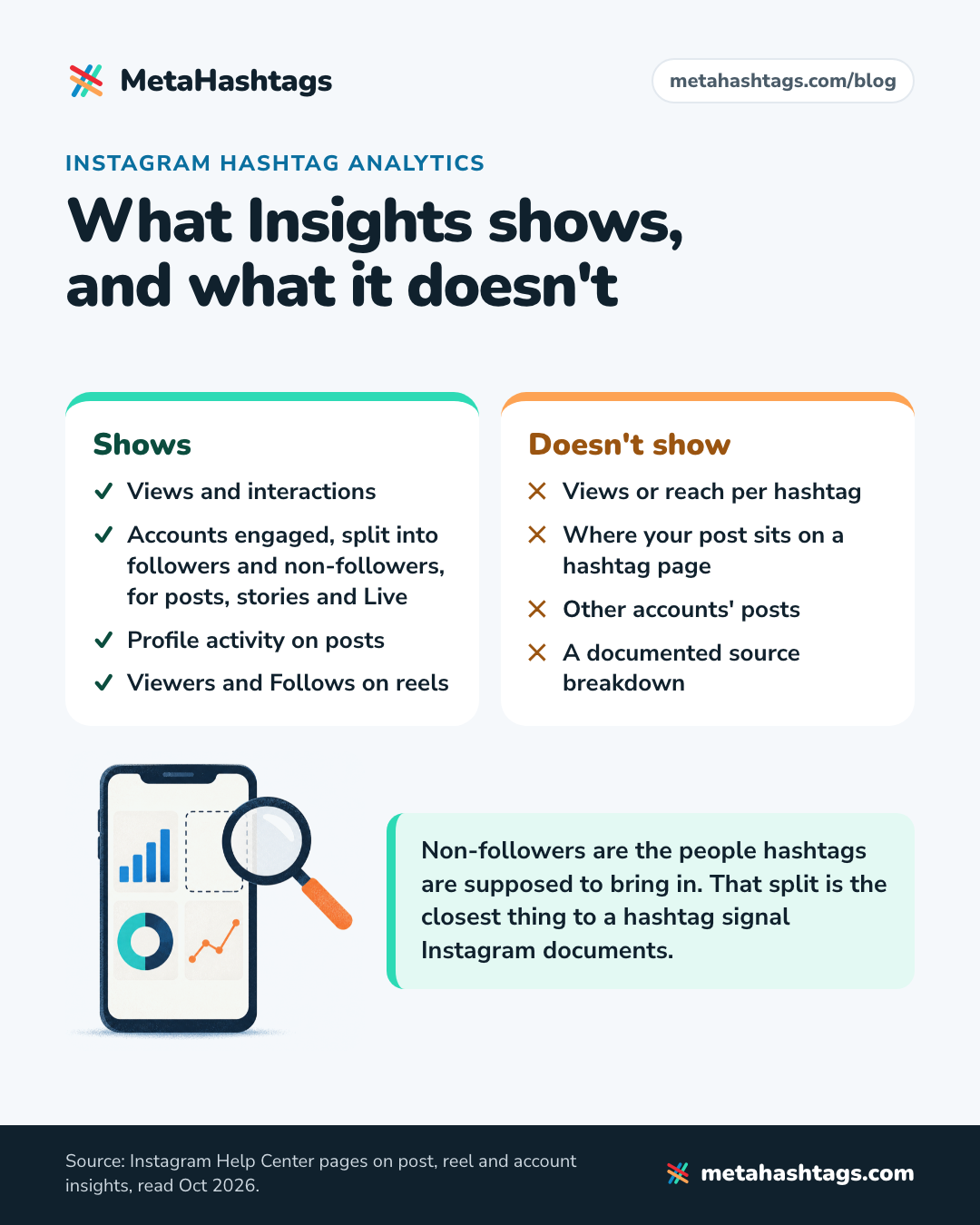
Insights show each post’s views, interactions, accounts engaged (split into followers and non-followers for posts) and profile activity, but no documented number for views from hashtags. Third-party trackers can’t fill that gap, because Instagram’s API has no hashtag metrics. What works is testing hashtag sets across similar posts.
I went through Instagram’s Help Center pages on insights and Meta’s developer docs. Here’s what’s measurable now, and a free spreadsheet test you can run on your own account.
What happened to “impressions from hashtags”
Older guides (and a few current ones) describe a line in post insights that showed impressions “from hashtags”. I couldn’t find it documented anywhere in Instagram’s own Help Center, and whatever it showed, it counted impressions, a metric Instagram has spent the last two years replacing. The timeline:
| When | What changed |
|---|---|
| July 2024 | Meta’s API stops reporting impressions for new posts: “For media created after July 2, 2024, this metric is deprecated.“ |
| August 2024 | Instagram announces Views as “the primary metric across all formats including reels, live, photos, carousels, and stories”. Repeat views count. |
| November 2024 | Instagram says it’s removing the ability to follow hashtags. |
| December 2024 | Meta switches off the Instagram Basic Display API, an older API that let apps read basic profile and media data. |
| April 2025 | Views becomes the main metric in Insights. Third-party vendors date the API’s final cut-over from impressions and plays to the same month. |
| December 2025 | Instagram caps hashtags at five per post, rolled out gradually. |
So any report showing “hashtag impressions” for a post published this year is relabeling something, and you should ask what. No app can bring back a breakdown Instagram doesn’t document; it can only estimate one.
What Instagram Insights shows about hashtags today
Insights are free, and you don’t need a business account. The Help Center says: “You need to have a public (personal or professional) account on Instagram to view insights.” A private account gets no insights, and its hashtags do nothing for discovery anyway: “When people with private profiles tag posts, they won’t appear publicly on hashtag pages.“
For a single post or reel
Tap View insights under a post or reel (that’s the Help Center’s wording) and you get these, defined in Instagram’s own words:
- Views, on a post: “The number of times your content was displayed.”
- Views, on a reel: “The number of times your reel starts to play or replay.“
- Viewers, on a reel: “The number of unique accounts that have seen your reel on screen at least once, whether or not your reel was played.”
- Interactions: “The number of actions people take when they engage with your content, such as likes, comments, saves and shares.”
- Profile activity, on a post: “The number of actions people take when they visit your profile after engaging with your post.”
- Follows, on a reel: “how many accounts started following you as a result of viewing your reel.”
Post insights are kept “for up to two years”, and reel insights for two years after the reel’s publish date.
Across your account
The account overview shows “Views, Interactions, New followers, and Content you shared” for a preset or custom timeframe “within the past 90 days”. For hashtags, one line on the About Instagram insights page matters more than the rest:
Instagram also labels some of these metrics “estimated and in-development”, which is a polite way of saying small differences don’t mean much.
What Insights doesn’t show
The Help Center pages on post, reel and account insights give you no views or reach per hashtag, nothing on where your post sits on a hashtag page, and nothing about other accounts’ posts.
Some guides (Brandwatch’s, from February 2025) say hashtags appear as a source in a post’s views breakdown when they contributed. The Help Center pages I read in October 2026 don’t mention a source breakdown at all. If your app shows one, treat it as a bonus, not something to build a process on.
What Instagram hashtag analytics tools can and can’t measure
Every legitimate hashtag tracker gets its Instagram data from Meta’s API, so the API’s rules set the ceiling on what any of them can know. Meta’s developer docs spell those rules out.
Hashtag search: 30 hashtags a week, no metrics
An app connected to a business or creator account can query “a maximum of 30 unique hashtags” in a rolling seven-day window, and each tag counts against that limit for seven days once it’s queried. For each tag it can fetch two lists: the most popular posts and the most recently published ones. The page doesn’t list a single performance metric; its example response is a list of media IDs.
More limits: “Hashtags on Stories are not supported.” Hashtags Meta has “deemed sensitive or offensive” return “a generic error”. And apps must pass App Review for Instagram Public Content Access to use hashtag search at all.
Media insights: your own posts, no hashtag field
The media insights endpoint gives an app your own posts’ numbers: views, reach, saves, shares, follows, profile visits and a few more. None of them is a hashtag metric, and none breaks views down by where they came from.
So where do “hashtag reach” numbers come from?
One of three places:
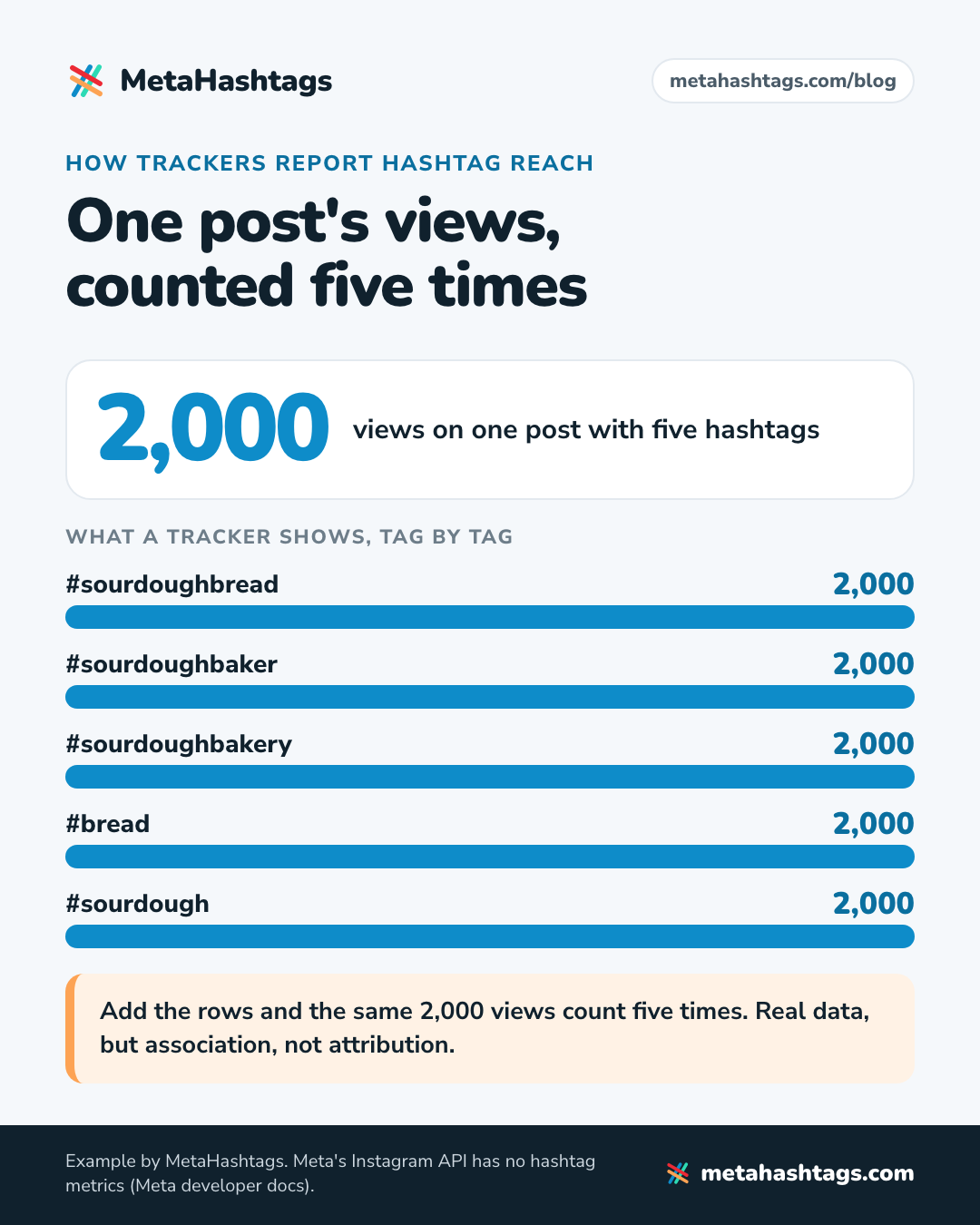
- Your own posts, grouped by tag. The tool reads each post’s real numbers and credits them to every hashtag on it. Say a post with five tags gets 2,000 views: each tag is shown with 2,000 views, and adding the rows up counts the same views five times. Real data, but association, not attribution.
- Sampling. The tool pulls a tag’s top and recent posts (inside the 30-a-week limit) and models how busy or competitive it is. Scores like Flick’s “Competition” and “Opportunity” come without a published formula.
- Scraping: data collected outside the official API, a terms-of-service risk for whoever runs it. If a tool asks for your Instagram password instead of sending you through Meta’s own login screen, close the tab.
None of these measures how many people found your post through a hashtag.
How to track hashtag performance on Instagram for free
This method needs Insights, a spreadsheet and about ten minutes a week. It won’t give you a number per hashtag (nothing will), but it will tell you whether one approach beats another on your account, which is the decision you actually face.
Step 1: Pick one number before you start
Hashtags put a post in front of people who search a tag or open its page. Adam Mosseri, who runs Instagram, said several times in 2025 that they don’t increase reach; they help people understand what a post is about and help with search (I went through the evidence in whether hashtags still work on Instagram). So watch the number that tracks new people:
- for photos and carousels: non-follower accounts engaged, with profile activity as the tiebreaker
- for reels: Viewers, with Follows as the tiebreaker
Decide now. If you choose afterwards, you’ll find whichever number makes your favorite set look good.
Step 2: Log every post in a sheet
| Column | What to write |
|---|---|
| Posted | Date and time |
| Format | Photo, carousel or reel, plus the topic |
| Set | A or B (step 3) |
| Hashtags | All five, exactly as typed |
| Day-7 numbers | Your chosen metric, plus Views and Interactions |
| Found in search? | Yes or no (step 5) |
Read every post’s numbers at the same age, say seven days after posting. Posts keep collecting views, so an older post always looks better. Account insights only cover the past 90 days, so log as you go. The content library in Insights, where you can “filter all your content by media type, reach, interactions and time frame”, speeds up the weekly catch-up.
Step 3: Keep three hashtags fixed and test two
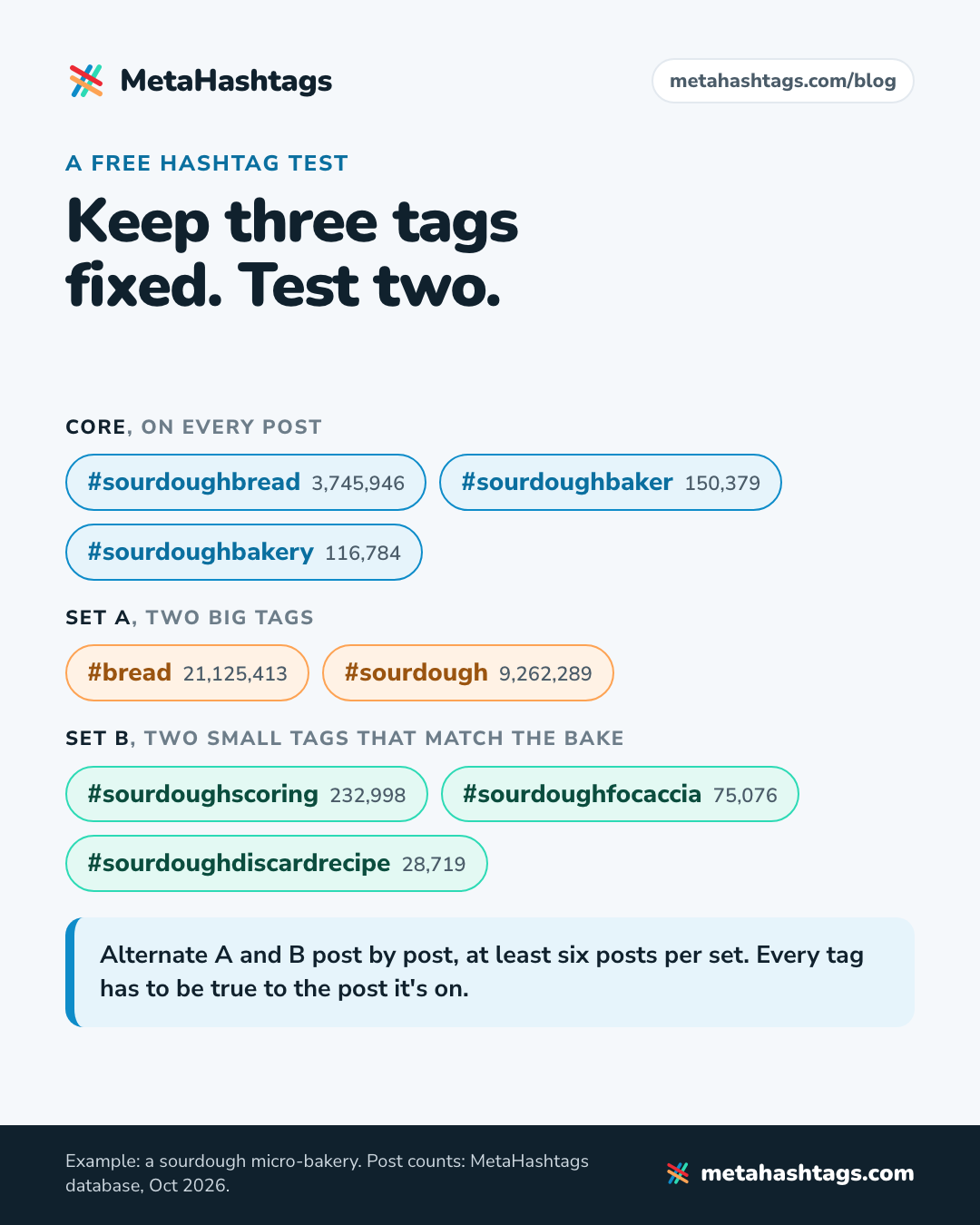
Five slots make for a clean design: three core hashtags on every post in the test, and two slots that change between sets. Alternate the sets post by post (A, B, A, B), spread your formats evenly so set A doesn’t end up with all the reels, and change nothing else mid-test. Move your posting time and swap hashtags in the same week, and you won’t know which one moved the number.
Put all five in the caption. Instagram’s Creators blog says keywords and hashtags belong in the caption, not the comments, if you want posts found in Search, and the limit is five tags per post (here’s how the five-hashtag limit works).
Say you run a sourdough micro-bakery and want to know whether big or small tags earn their two slots. Post counts are from our database, October 2026:
- Core, every post: #sourdoughbread (3,745,946 posts), #sourdoughbaker (150,379), #sourdoughbakery (116,784)
- Set A, two big tags: #bread (21,125,413) and #sourdough (9,262,289)
- Set B, two small tags that match the bake: #sourdoughscoring (232,998) on a scoring shot, #sourdoughfocaccia (75,076) on a focaccia, #sourdoughdiscardrecipe (28,719) on a discard recipe
Every tag has to be true to the post it’s on. A test that puts #sourdoughfocaccia on a photo of a bagel is testing something else. If you haven’t settled on your core tags yet, my guide to using hashtags on Instagram covers how to pick them.
Aim for at least six posts per set, ten if you post often. One post tells you nothing: any single post can take off for reasons that have nothing to do with its hashtags.
Step 4: Compare medians, not averages
Once both sets have enough posts, take the median of your chosen number for each. The median ignores the one post that took off; the average doesn’t. My rule: a gap under about 20% is a tie. Check it against how much your posts normally vary. If your ordinary posts swing by half from one to the next, a 20% gap is noise.
Never compare a reel’s Views with a photo’s Views. Instagram defines them differently: “displayed” for posts, “starts to play or replay” for reels.
Step 5: Check that the post actually shows up
Insights can’t tell you whether your post appears when someone searches the tag, so check by hand. A day or two after posting, search each test hashtag and look for your post. Then search the main keyword from your caption, since Instagram search matches keywords too (the Instagram SEO guide explains how captions and hashtags work together).
Instagram says the order of hashtag search results depends on “When the post was shared.” “How others engage with the post.” and “If content meets our Recommendation Guidelines.” It doesn’t say whether two people searching the same tag see the same results, so ask a friend who doesn’t follow you to check too. Write yes or no in the sheet.
If your posts never appear for any tag, your hashtag choice isn’t the problem. Make sure none of the tags is restricted, and if you have a professional account, open Account Status, which shows whether your content may be eligible to be recommended.
Step 6: Keep, rotate or retire
- If one set wins clearly, make that approach your default for the two test slots.
- If it’s a tie, keep whichever tags describe your posts most accurately.
- Drop any test tag that hasn’t shown your post in search after five or six uses.
- Change one slot at a time for the next round, and leave the core alone while a test runs.
Track a hashtag’s growth over time
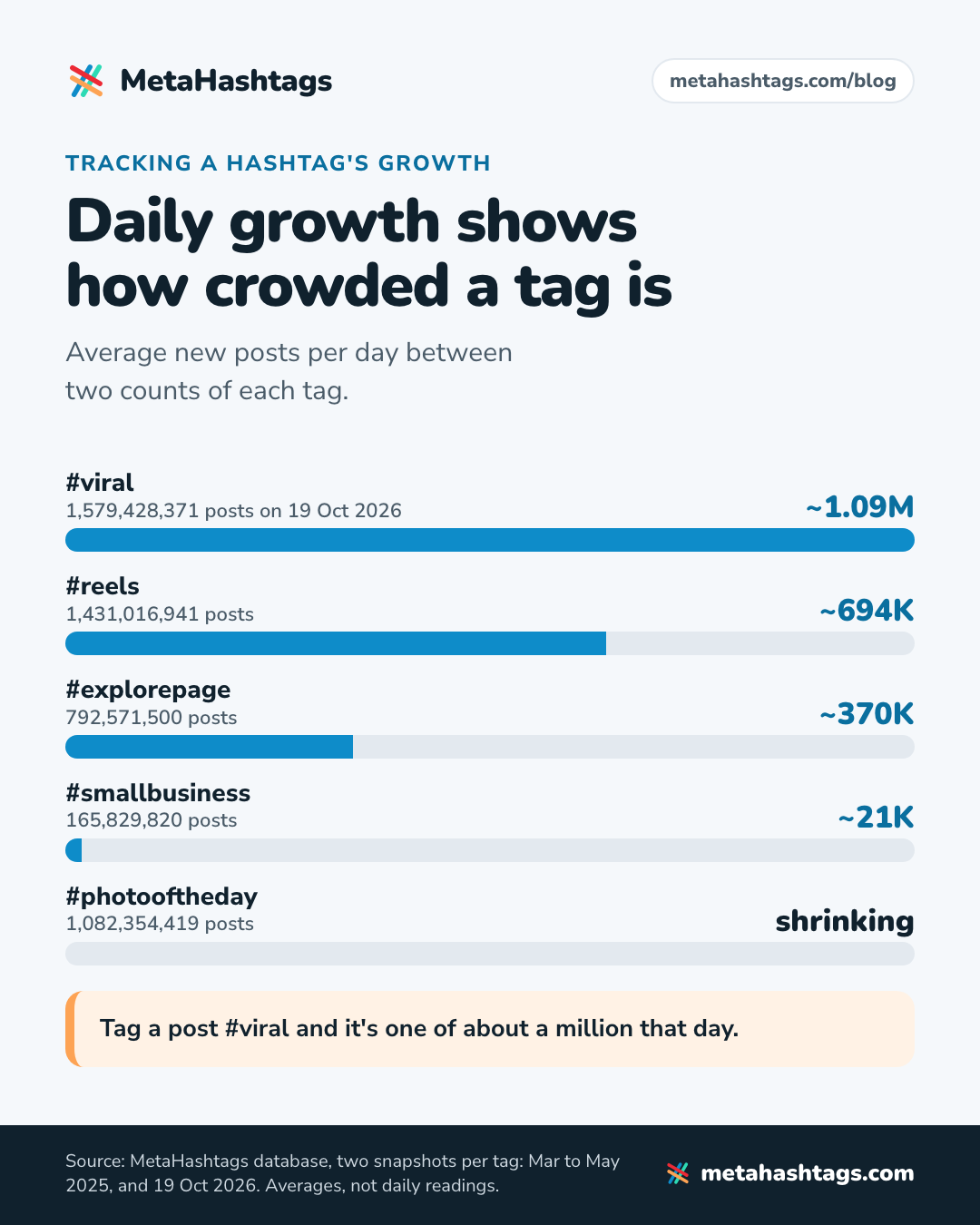
To see how a hashtag itself is doing, track its post count: note it today, check again in a month, and divide the difference by the days in between. New posts per day tells you what the all-time total can’t, namely whether the tag is still alive and how crowded it is. Here it is on two snapshots from our database (MetaHashtags data, October 2026):
| Hashtag | Earlier count | 19 Oct 2026 | Per day |
|---|---|---|---|
| #viral | 988,579,798 (27 Apr 2025) | 1,579,428,371 | ~1.09M |
| #reels | 1,032,364,659 (24 Mar 2025) | 1,431,016,941 | ~694K |
| #explorepage | 595,371,297 (4 May 2025) | 792,571,500 | ~370K |
| #smallbusiness | 154,564,408 (3 May 2025) | 165,829,820 | ~21K |
| #photooftheday | 1,093,195,469 (5 May 2025) | 1,082,354,419 | shrinking |
#viral took on about 590.8 million posts in just under 18 months, roughly 13 a second. Tag a post #viral and it’s one of about a million that day. #photooftheday went the other way: its count fell by 10.8 million, most likely from deleted posts and removed tags, so counts can shrink. These are averages between two snapshots, not daily readings.
Some counts can’t be tracked at all. #love returns exactly 2,147,483,647 posts, the largest number a signed 32-bit integer can hold, so Instagram’s counter for it has topped out. For what a post count does and doesn’t tell you, see how to check hashtag popularity.
How to track a branded or campaign hashtag
A branded hashtag is the one case where the post count is your result. Before you launch, search the tag in Instagram. If it already has posts, pick another, or your count will include strangers.
- Note the count on launch day and once a week after. The difference is how many posts used it.
- Open the hashtag page weekly and log who posted. You’ll only see public posts: “If you have a public account and add hashtags to a post, the post will be visible on the corresponding hashtag page.“
- A social listening tool that pulls the tag for you uses the same hashtag search as above, so it works inside the 30-a-week limit and can’t see Stories.
- Measure sales separately, with a link or discount code used only in the campaign. The hashtag count measures participation.
Hashtag analytics for Reels
For reels, use Viewers rather than Views. Views counts every start and replay, so a reel people loop gets credit for each loop; Viewers counts unique accounts. Follows stands in for profile activity, and the Help Center documents no followers and non-followers split for reels.
Expect small gaps between sets. Hashtags are a minor input next to everything else that decides where a reel goes, so run more reels per set than you would photos.
Do you need a paid hashtag tracker?
For your own account, no. A tracker’s report on your posts is your Insights data grouped by tag, with the double-counting built in, and its numbers for other hashtags are estimates from a sample. A sheet and the six steps above give you a cleaner answer. Paying makes sense when you’re monitoring a campaign hashtag across lots of posts or running many accounts, where you’re buying time. If you do pay, ask the vendor where each number comes from (your posts, a sample or a model) and whether one post gets counted under several tags.
Instagram hashtag analytics FAQ
Do I need a business account to see Instagram Insights?
No. Any public account, personal or professional, gets insights. Private accounts don’t, and their tagged posts don’t appear on hashtag pages.
How long does a post stay on a hashtag page?
Instagram doesn’t publish a time. It orders results by when a post was shared, how people engage with it and whether it meets the Recommendation Guidelines. Step 5 shows how to check yours.
Does the five-hashtag limit change how I track hashtags?
It makes testing easier. With five slots you can keep three steady and swap two, which was never clean with 30 tags and a dozen changing at once.
Keep reading
-
 Instagram Hashtags
Do Hashtags Still Work on Instagram in 2026? Yes, but Not for Reach
Hashtags still work on Instagram as labels, not as a reach hack. What Instagram has said, why the studies disagree, and a four-week test… -
 Instagram Hashtags
How Many Hashtags on Instagram in 2026? Five, and How to Pick Them
Instagram now allows five hashtags per post, not 30. What changed, what happens if you add a sixth, what the studies say about using… -
 Instagram Hashtags
How to Use Hashtags on Instagram in 2026 (Now You Only Get Five)
Instagram now allows five hashtags per post. What they still do, where to put them, and how to pick the right five, with live…